Inspecting risk: Deal Risk, Slippage & Aging, Pipeline Hygiene
Three reports that find the open deals needing a conversation: which are at risk, which keep slipping, where your rules are broken, and what each cannot flag yet.
Three questions about the open book
These three reports sit in Reporting's Pipeline category and are built to be read together. Deal Risk answers "which open deals are at risk right now?" Slippage & Aging answers "which deals keep moving, and which are sitting still?" Pipeline Hygiene answers "where is the CRM breaking the rules we wrote?"
All three need View Pipeline. Pipeline Hygiene also needs View AI Agents, because the rules it reports on belong to the Sales Agent. Deal Risk and Slippage & Aging take the Team filter, so a manager can read their own team. Pipeline Hygiene is company-wide. None of them takes a fiscal quarter, because they read the open book as it stands today.
A good Monday order is Deal Risk, then Slippage & Aging, then Pipeline Hygiene: the deals that need a conversation this week, then the patterns behind them, then the rules that should have caught them.
Deal Risk: four flags and a matrix
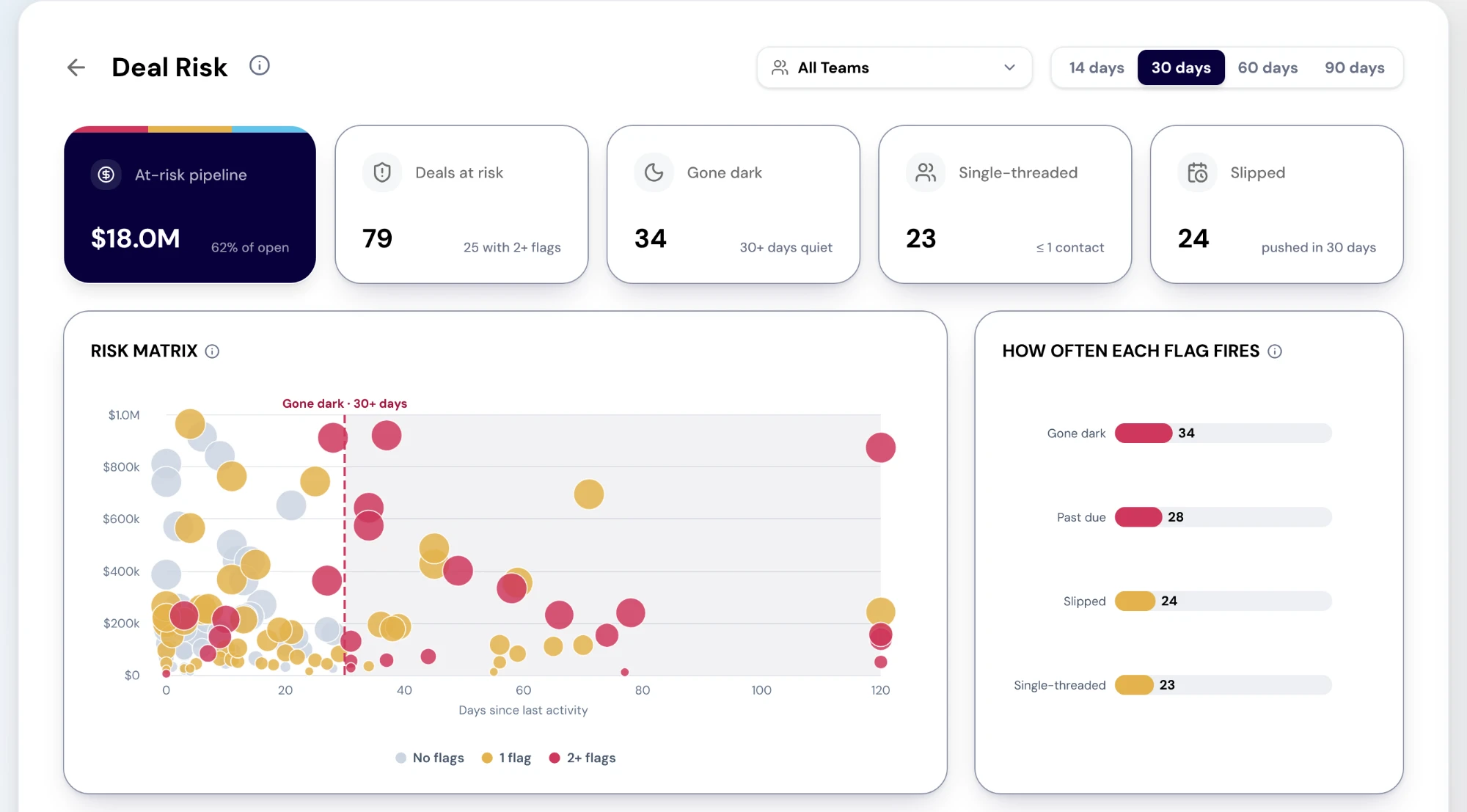
Deal Risk flags every open deal against four tests over a period you choose in the header: 14, 30, 60 or 90 days, with 30 as the default. Gone dark means no logged activity in the period, or none ever. Single-threaded means one contact or fewer on the deal, and a deal whose contact count is unknown is never flagged. Slipped means the close date was pushed within the period. Past due means the close date has gone by and the deal is still open.
The cards give the size of the problem: At-risk pipeline with its share of open pipeline, Deals at risk with how many carry two or more flags, and the counts for Gone dark, Single-threaded and Slipped. The Risk matrix plots each open deal by amount against days since its last activity, coloured by how many flags it carries, with the gone-dark zone shaded. How often each flag fires shows which failure is most common, and selecting a bar lists those deals. The Deals at risk table puts the most-flagged deals first, then the largest, with amount, close date, last activity and contacts, and its filter panel narrows by flag, owner, stage and amount.
What Deal Risk does not flag yet
Three signals you might expect are not flagged: a champion who has left, an open breach of one of your SLA rules, and a low AI win chance. Each needs data RevTech does not yet serve to reports in bulk, and the flag chart's own info text says so rather than approximating them. For rule breaches, read Pipeline Hygiene.
So read a deal with no flags as "none of these four tests fired", not as "this deal is healthy". A deal can be well threaded, recently active and on its date, and still be lost to a competitor nobody logged.
Slippage & Aging: movement and stillness
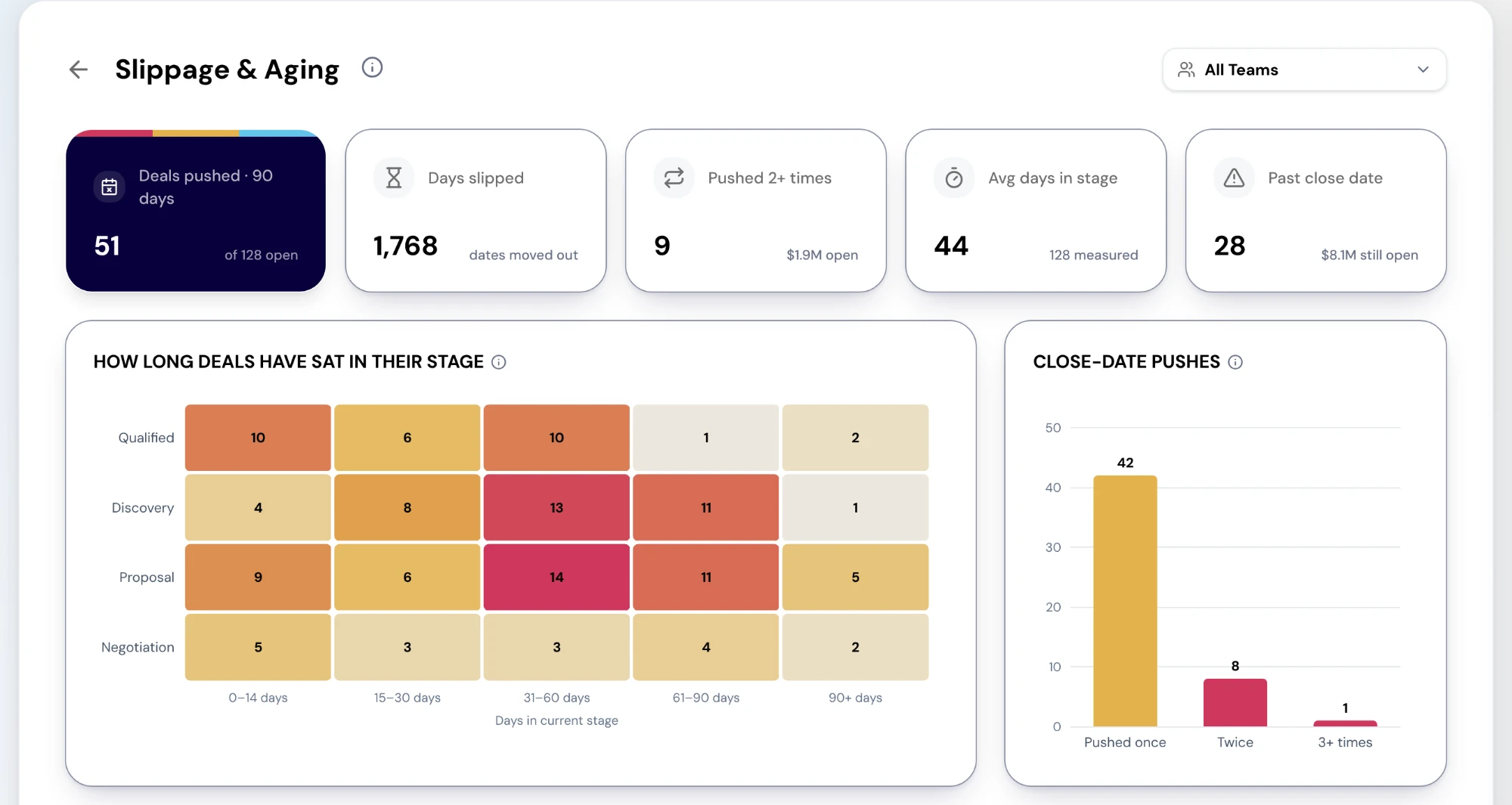
Slippage & Aging looks at the same open book from two directions. Pushes are deals whose close date keeps moving out. Aging is deals that are not moving at all. The cards read Deals pushed in the last 90 days, Days slipped, Pushed 2+ times, Avg days in stage and Past close date.
How long deals have sat in their stage is a heatmap of open deals by stage and days in stage, and selecting a cell lists its deals. Close-date pushes splits the pushed deals into pushed once, twice and three or more times. Average days in current stage shows each stage's average, with stages slower than the book average in amber. Deals by slippage lists every open deal, most pushed first, with pushes, days slipped and days in stage.
One limit matters more than the rest. Push counts come from close-date changes in the last 90 days, and that history only exists from the day your CRM was connected to RevTech. A deal pushed three times before then reads as never pushed. The report says so in its section info.
Pipeline Hygiene: your rules, rolled up
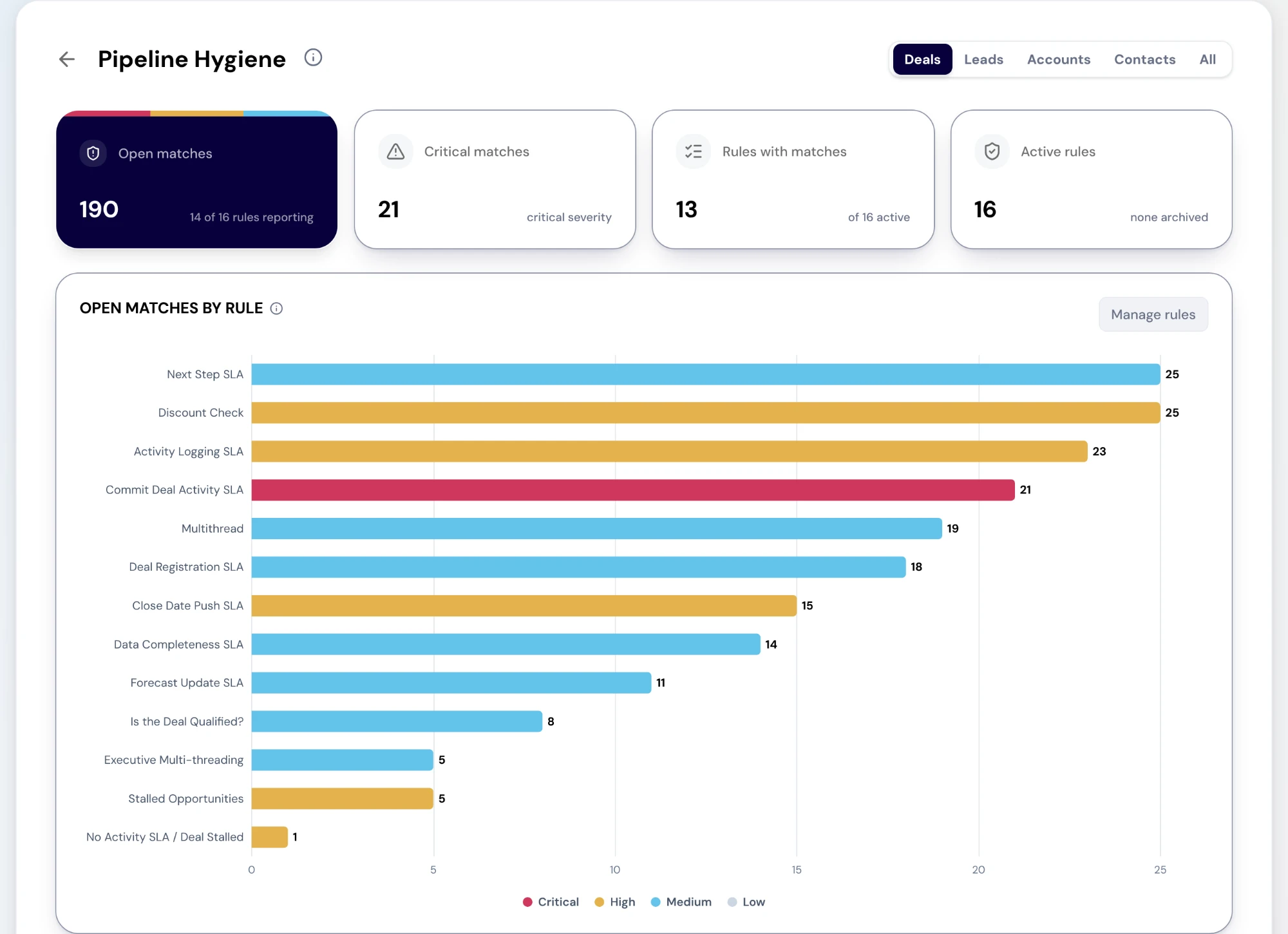
Pipeline Hygiene does not have its own idea of a clean pipeline. It reports on the SLA rules you set in the Sales Agent's Sales Process, under AI Agents, and nothing else. Choose the object in the header: Deals, Leads, Accounts, Contacts or All. The cards read Open matches, Critical matches, Rules with matches and Active rules.
Open matches by rule charts each active rule's open matches at its last run, largest first, up to fifteen rules, coloured by severity. Selecting a bar opens that rule in Sales Process, which is where its health, last run and settings live. If an object has no rules yet, the page says so and points you to Sales Process.
Be clear about the limit: this report shows how many records match each rule, not which records. The breaching records are not listed in reports yet. They reach the people each rule notifies as Action Center cards, which is where the fix happens.
Cards are about one deal; reports show the pattern
The Action Center and these reports look at the same deals from different heights. A card in the Action Center is about one deal and goes to the person who owns the next move. A rule breach arrives there for whoever the rule notifies. On the deal record itself, Deal Conditions name the failure for that one deal.
Watch one naming difference. On the deal record, "Slipping" means the close date has passed, which Deal Risk calls Past due. Deal Risk's "Slipped" means the close date was pushed. They answer different questions, so a deal can carry one and not the other.
What the reports add is the shape. If most single-threaded deals belong to one rep, that is a coaching conversation. If the aging sits in one stage, that is a process or a rule. If one rule carries most of the open matches, the rule or the stage it guards needs a look. One card is a task. Thirty of the same card is a pattern, and a pattern needs a different response.
Ending in a move
An inspection that ends with a list nobody owns has not finished. For each deal you pull out, choose one move before the meeting ends. Open it from the table, since every row opens the deal as a sheet over the report and Close drops you back on the list, and fix what is wrong in the CRM or on My Pipeline. Escalate its Action Center card to the manager who can unblock it. Enroll the account in a RevPlay built for the situation, such as re-engaging a quiet buying group. Or take the pattern into a 1:1, where the owner name in Deal Risk opens that rep's page.
When the same failure keeps turning up, stop finding it by hand. Write it as a rule in Sales Process, so the Sales Agent checks it every day and the breaches arrive as cards for their owners. Next month the count in Pipeline Hygiene tells you whether it worked.
What to take away
- Deal Risk asks which deals are at risk now, Slippage & Aging which keep moving or sit still, and Pipeline Hygiene where your rules are broken.
- Deal Risk flags four things only: gone dark, single-threaded, slipped and past due. No flag is not the same as safe.
- Slippage counts pushes from the last 90 days, and only since your CRM was connected to RevTech.
- Pipeline Hygiene shows how many matches each rule has, not which records. The records reach their owners as Action Center cards.
- An Action Center card is about one deal. These reports show whether it is one deal, one rep, one stage or the whole book.
Put it to work
Jobs this page is behind
- SellingCatch a deal before it slips“I want to hear that a deal is in trouble while there is still time to do something.”
- SellingRun a pipeline review in an hour“I want to run a weekly pipeline review that is a decision rather than a data-quality session.”
- SellingStop chasing reps for the same three fields“I want to get the process followed without personally chasing anybody.”
- Forecast and planKnow exactly what it takes to hit the quarter“I want to know exactly what it takes to hit the quarter while there is still time to change it.”
- Forecast and planSee what changed in the pipeline this week“I want to see every material change to the pipeline since last week without asking each rep.”
See how the work gets done.
Explore how agents prepare work across your revenue teams, and how people review it, guide it and decide what happens next. Fictional data. Real product.
Explore the demo