Know exactly what it takes to hit the quarter
Gap to Target puts the remaining gap, what is open to close it and the wins it takes on one page. Read it, find the deals, and give each one an owner.
The job
“I want to know exactly what it takes to hit the quarter while there is still time to change it.”
- Sales leaders
- Sales managers
- RevOps
- Finance
Most forecast conversations start from the projection and argue about whether it is right. The more useful starting point is the gap: how much of the target is still unwon, and whether what is open can plausibly cover it. A projection tells you where the quarter may land. The gap tells you what has to happen for it to land somewhere else.
"We are short" is not an instruction. It becomes one when it is broken down into the wins needed, the reps carrying the shortfall and the deals that would close it. RevTech keeps that breakdown current from the CRM, so the meeting can start at the decision instead of building the picture.
What it moves
- Forecast variance
- Pipeline coverage quality
- Deal risk detection
The division of labour
What RevTech does, and where you decide
In the product
How to do it
- Step 1 of 5
Start from the five cards on Gap to Target
Open Reporting → Gap to Target and set Team, Fiscal Year and Quarter in the header. The cards read left to right as one argument: Remaining gap to the target, Won so far, Commit + upside open (with how many times it covers the gap), Wins needed, and the AI projection as a share of the target. Wins needed is the gap divided by your average won deal, rounded up. It sizes the job; it does not name the deals.
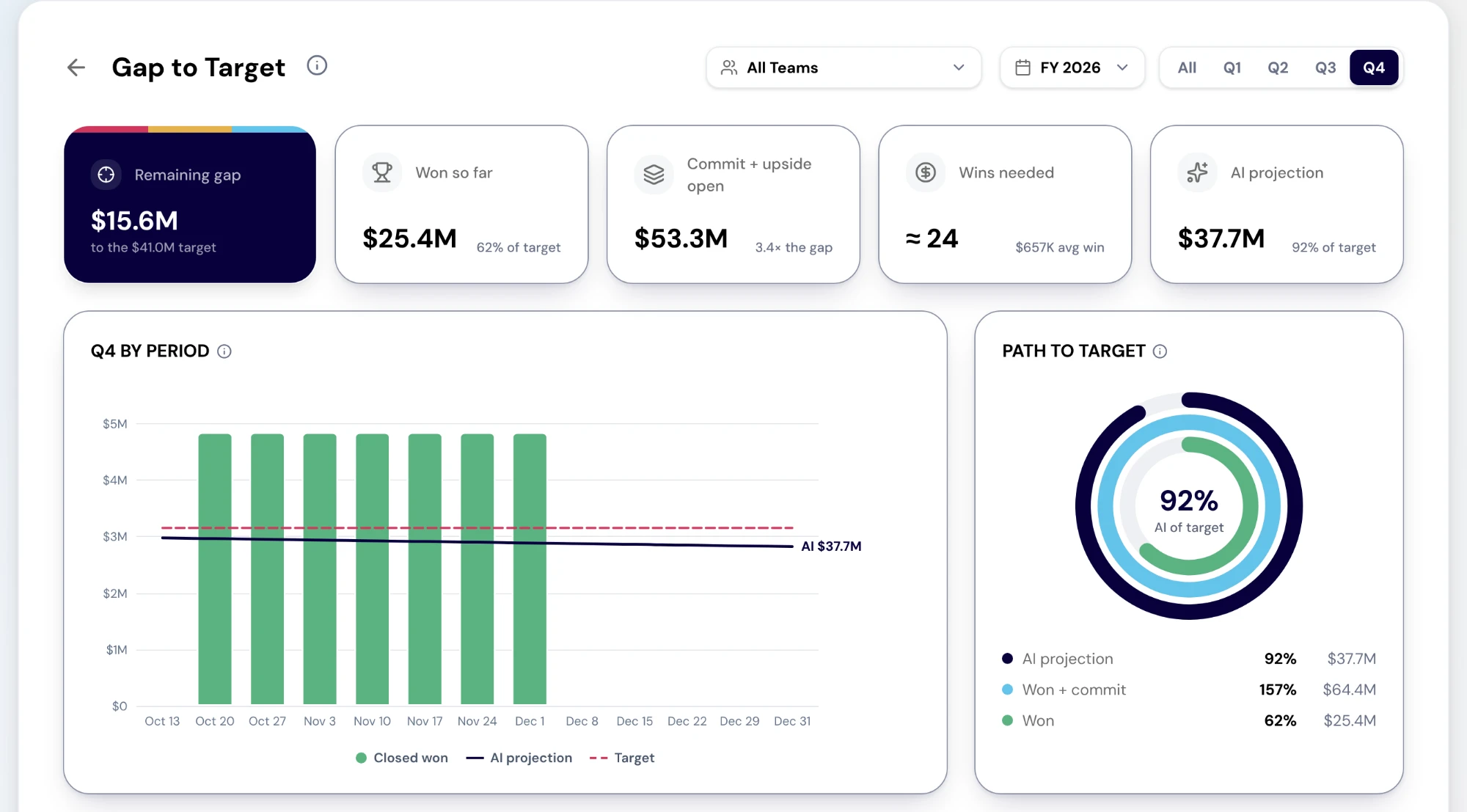
The Gap to Target report. Cards show the remaining gap to the period’s target, won so far, commit plus upside still open, an estimate of the wins needed at the average won deal, and the AI projection. Below, closed won and the projection are charted against target by period, beside rings showing the path to target. Sample data. Screenshot of the RevTech application; sample data. Gap to Target in the demo workspace: the remaining gap, won so far, open commit and upside, wins needed and the AI projection, above the period chart. - Step 2 of 5
Check whether the open pipeline actually covers it
How the gap closes draws the target as one bar: closed won, open commit and upside stacked against it, and the gap nothing covers yet. If that last segment is large, the quarter is a pipeline problem and no amount of deal inspection will fix it. If commit and upside cover it, the quarter is an execution problem, and the rest of this page is about execution.
- Step 3 of 5
Find who is carrying the gap
Gap by rep sorts reps by their own remaining gap, shows Open ÷ gap for each, and gives each a status. Select a rep to open their Rep Performance page. For the call itself, the Forecast report’s Forecast by rep table carries the same people with target, closed won, commit, upside and pipeline.
- Hit target: won has reached their target
- On pace: won plus commit reaches it
- Stretch: it takes upside as well
- At risk: even commit and upside fall short
- Step 4 of 5
Inspect the deals that would close it
Open Deal Risk for the same team. It flags open deals that have gone dark, are single-threaded, have slipped or are past due, and the Deals at risk table puts the deals with the most flags, then the largest, first. A commit deal on that list is the first conversation of the week.
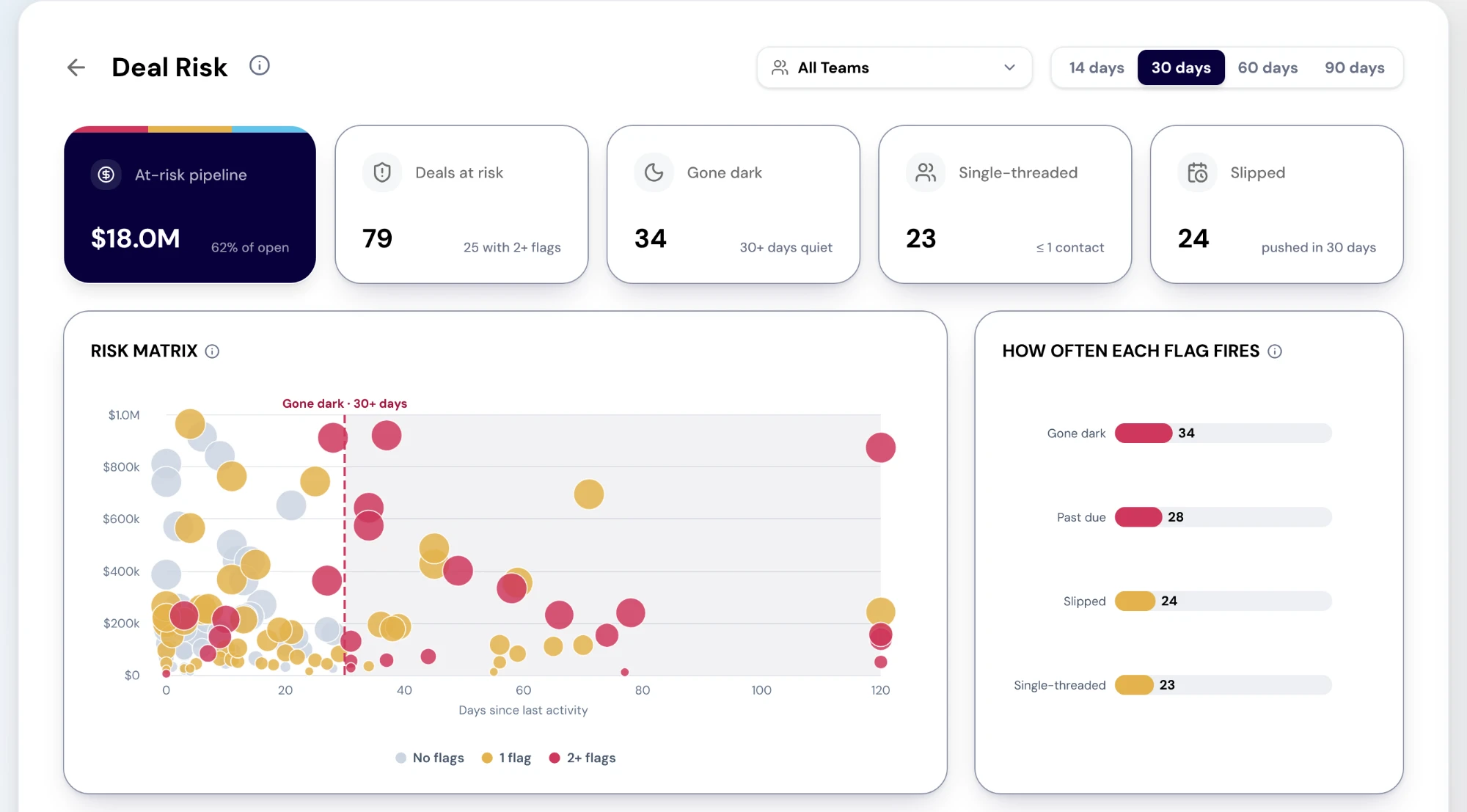
The Deal Risk report. Cards show the at-risk pipeline and how many open deals carry each flag. A risk matrix plots deals by days since last activity and amount, coloured by how many flags they carry, beside a chart of how often each flag fires: gone dark, past due, slipped and single-threaded. Sample data. Screenshot of the RevTech application; sample data. Deal Risk: at-risk pipeline and the count behind each flag, the risk matrix, and the open deals carrying the most flags. - Step 5 of 5
End with an owner and a move on every gap deal
Each gap deal leaves the meeting with a move: a next step its owner commits to, an escalation from its Action Center card to whoever can unblock it, or its account added to a RevPlay so the follow-through runs as a motion rather than from memory. Add to RevPlay sits on Objects → Accounts for people who can decide RevPlay work. A gap that ends the meeting without names against deals is still just a number.
What arrives
What this puts in your Action Center
| Item | What is prepared | How it resolves |
|---|---|---|
| TargetAtRisk | A ranking of the deals that would close the gap | Performance |
| CloseDateAtRisk | The gap before the slip, plus a drafted mutual-plan checkpoint | The deal, on its Journey tab |
| DealPushed · DealPulled | Stakeholders to re-engage, or a readiness check | The deal, on its Journey tab |
| ForecastCategoryChange | The recomputed rollup impact of a deal moving between Commit and Upside | The deal, on its Journey tab |
Where this is today
Wins needed is the gap divided by your average won deal; a count of deals still to create is not built yet. Deal Risk flags gone dark, single-threaded, slipped and past due only — not a champion leaving, SLA breaches or AI win chance. Gap by rep needs team:read, and its target columns need targets:read.
What to take away
- Start from the gap, not the projection. The gap is what the meeting can change.
- If open pipeline cannot cover the gap, it is a pipeline problem. If it can, it is an execution problem.
- Wins needed sizes the job. Gap by rep and Deal Risk name the people and the deals.
- Every gap deal leaves the meeting with an owner and a move.
See how the work gets done.
Explore how agents prepare work across your revenue teams, and how people review it, guide it and decide what happens next. Fictional data. Real product.
Explore the demo