Analyst Agent
Walk in informed.
Make the conversation count.
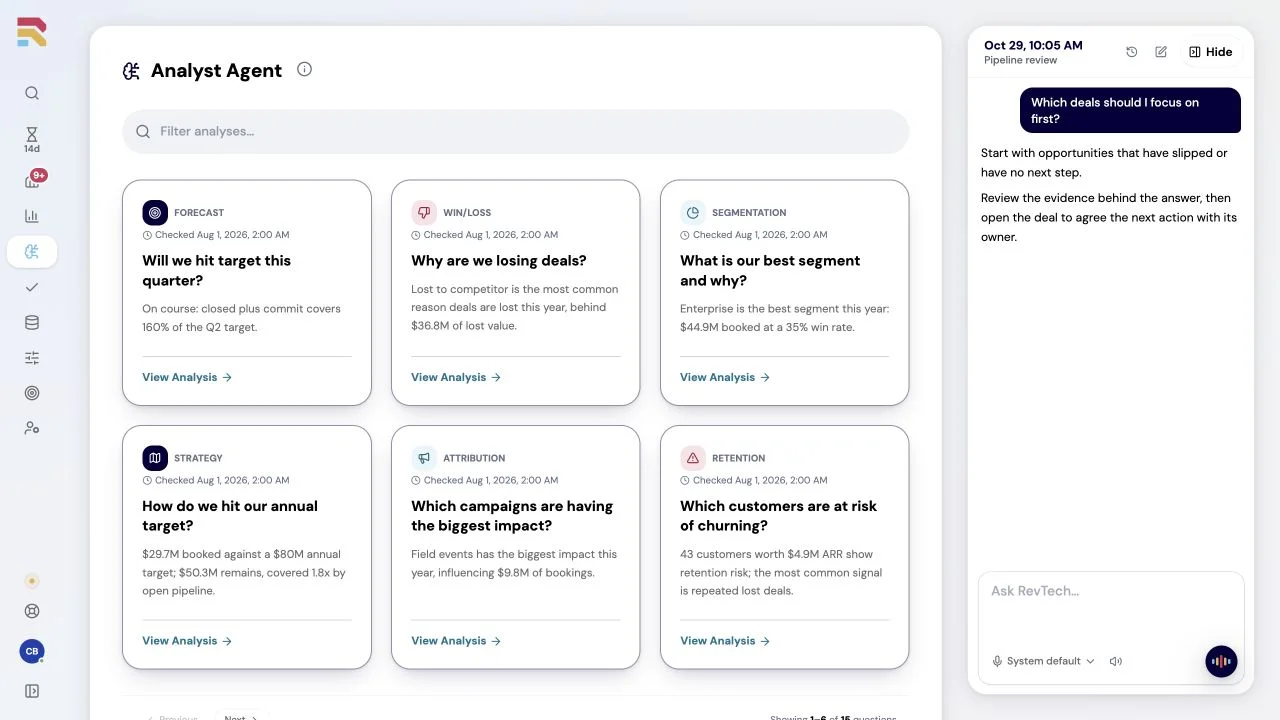
Spend the meeting deciding what to do next. The Analyst Agent prepares answers to recurring revenue questions from your CRM data, on your schedule, with the evidence attached. RevTech runs the analysis; your team brings the judgment.

In short
What is the Analyst Agent?
The RevTech Analyst Agent answers revenue questions using your CRM data, including pipeline movement, conversion and coverage. You define the question and schedule; the agent returns recurring analyses, period comparisons and executive briefings with supporting sources and records. Your team can inspect the evidence and pause, resume or adjust each analysis.
Make time to understand the answer.
The RevTech Analyst Agent runs your revenue questions against CRM data on a schedule you set: pipeline movement, conversion, coverage, and change over time. Each analysis returns the answer and the evidence behind it, and you can pause, resume, or retune any analysis at any time. Leaders act on current facts, not last quarter’s export.
Analysis scales with people
Recurring questions can send people back to pulling, cleaning, and formatting the same information.
Answers age fast
By the time the deck is built, the pipeline has already moved.
Evidence gets lost
Numbers travel without the why, and meetings burn time re-deriving them.
Ask once. Stay answered.
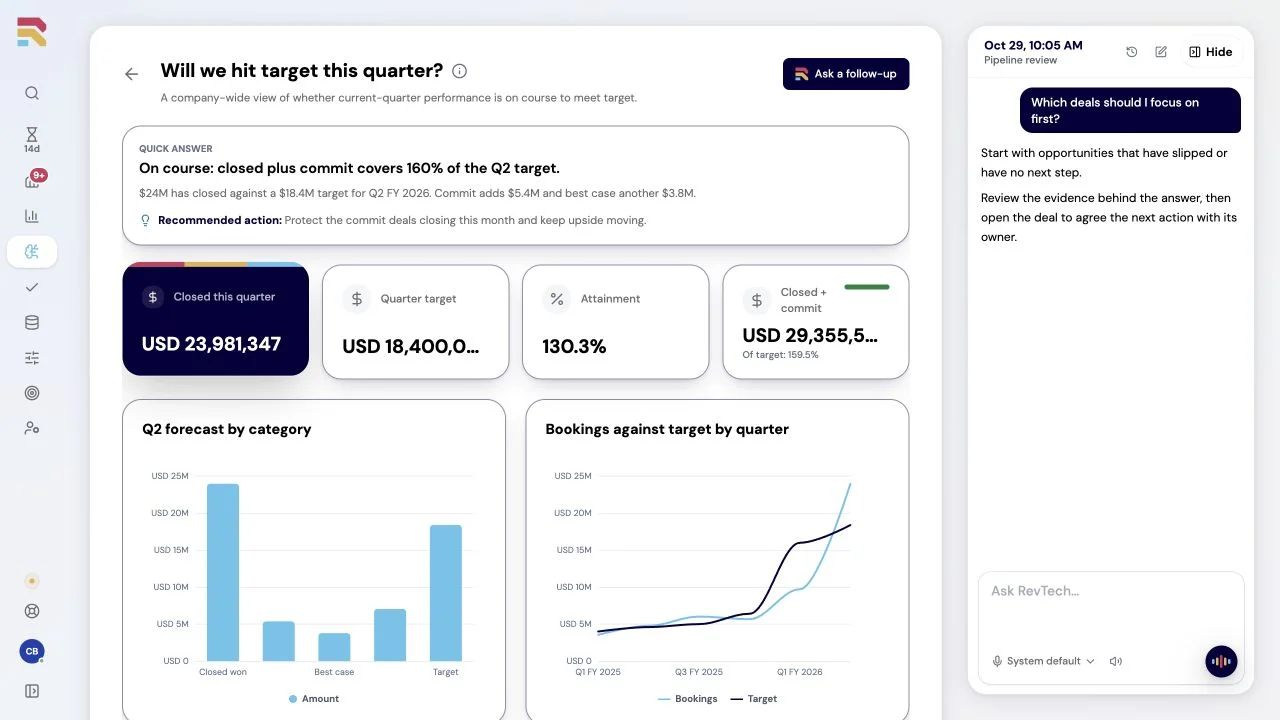
Set the question and the cadence once. The agent runs the analysis on schedule, attaches the evidence and sources, and compares periods so change is visible instead of argued about.
Trust the number, because you can see where it came from
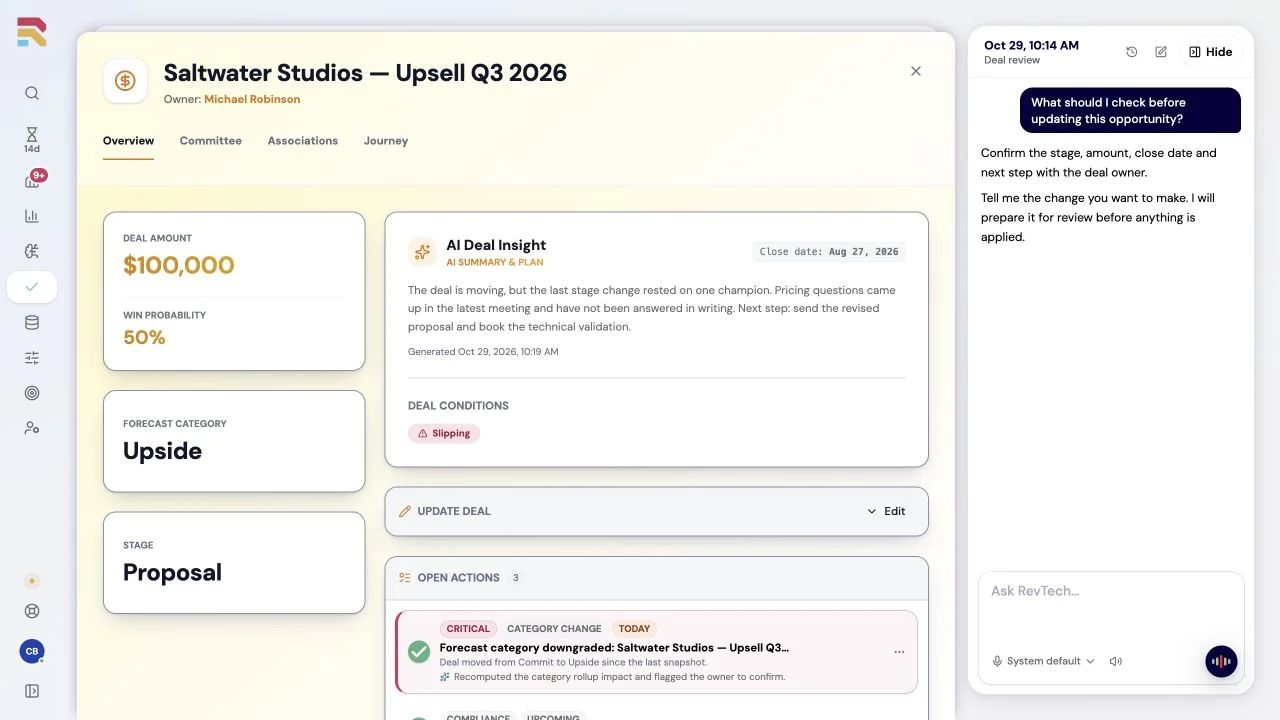
An answer is only worth as much as the data under it. RevTech organises and maintains that data as part of the managed service: records reconciled, definitions maintained, and data gaps surfaced for attention. So every answer opens onto its evidence: the sources it drew on, the records behind each figure, and the same period-over-period basis every time. Nobody has to take the number on faith, and nobody has to re-derive it in the meeting.
Business impact
Arrive ready to decide.Save 375 hours a year.
Let recurring reports arrive with their evidence, giving your team more room for questions, discussion and deeper analysis.
Value and cost assumptions
All amounts are USD. The $6,000 starting budget is an example, not an agent price. Include allocated platform, credit, setup and operating costs. Check pricing.

Annual capacity value
$25,313
281 reusable hours at $90/hour.
- Value less investment
- $19,313
- Capacity-value ROI
- 321.9%
Illustrative estimate in USD. Value assumes useful reuse of recovered time; it is not cash savings or guaranteed revenue.
How this is calculated
Prepare one revenue answer with its sources and period comparison. Include question setup, evidence checks, data-gap investigation and interpretation in the time with the agent.
Annual hours = 5 items/week × (120 manual minutes − 30 minutes with agent) ÷ 60 × 50 working weeks. Hours are displayed rounded to the nearest hour; value uses the unrounded calculation.
Capacity value = recovered hours × 75% reuse × $90/hour. Extra human time counts as a cost in full. ROI = (capacity value − investment) ÷ investment; zero investment leaves ROI undefined.
Compare equal work volume, complexity and quality. Include review and maintenance time, avoid overlapping savings across agents, and allocate shared costs once. Explore the full ROI calculator.
Questions teams ask
Practical answers for teams evaluating the Analyst Agent.
Explore the other agents.
Choose the work you want help with. Agents share business context and follow your permissions and review rules across GTM.
See how the work gets done.
Explore how agents prepare work across your revenue teams, and how people review it, guide it and decide what happens next. Fictional data. Real product.
Explore the demo