Running RevTech: access, teams and credits
The administrative half — company settings, roles, users, billing and credit usage. Set up in the right order, then reviewed on a rhythm.
The order of setup
Settings is where you decide how RevTech sees your business, and the sequence is not arbitrary. Company settings first: regional defaults, currency, and the fiscal calendar, which drives how every forecast, quota and KPI gets bucketed. Then connect the CRM, because everything else assumes it. Then roles, then teams, then invite people.
Doing it in this order means each decision is made once. Inviting people before roles are customized means a round of reassignment; setting targets before teams exist means orphaned numbers.
Roles: scope first, then sections
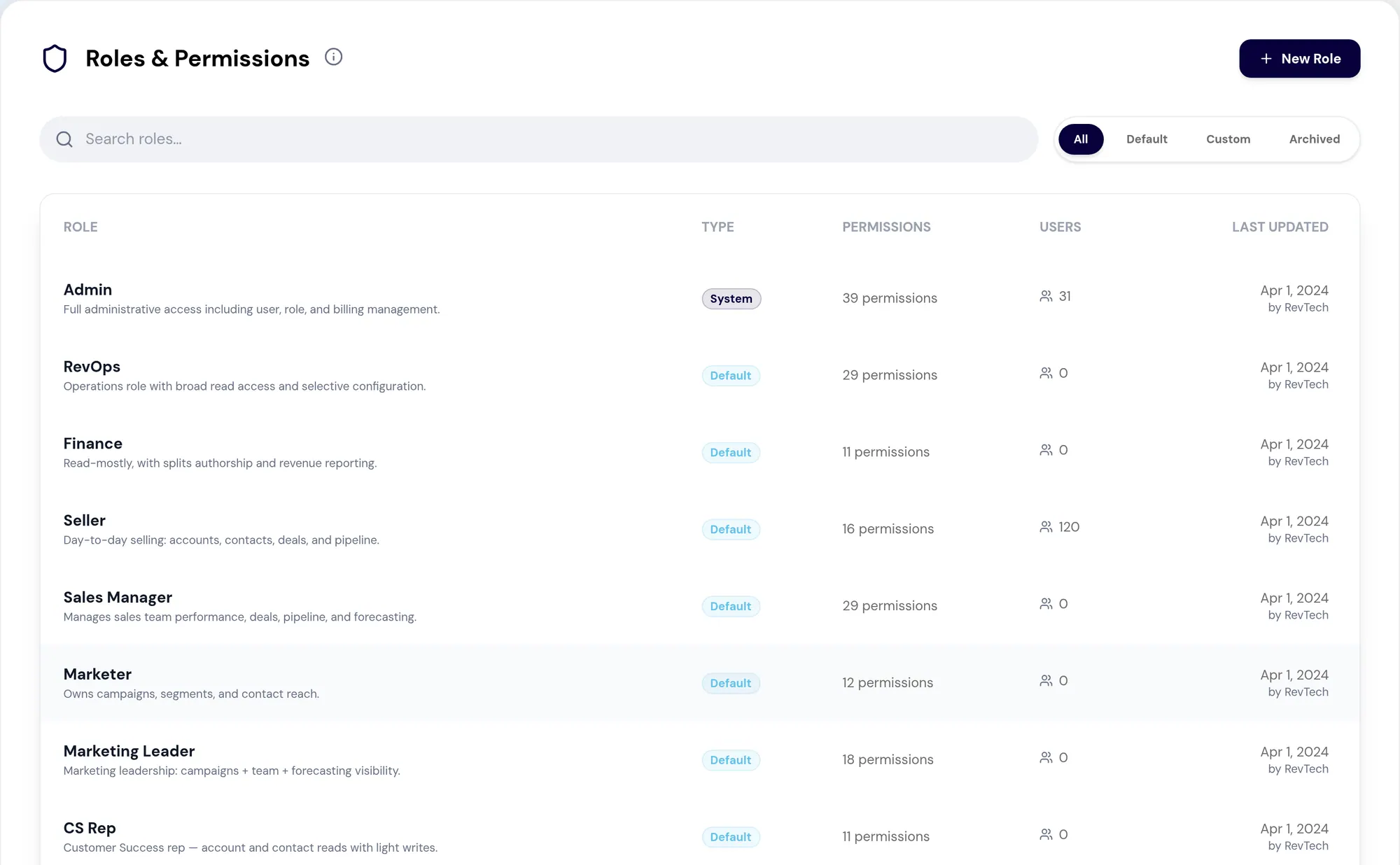
RevTech ships eleven default roles modelled on a real B2B revenue org — Admin, RevOps, Finance, Sales Manager, Seller, Marketer, Marketing Leader, CS Rep, CS Leader, Executive, Observer. Most teams clone these rather than inventing from scratch, which is the right instinct.
Inside a role, scoped record access is the setting to get right first, because it shapes everything below it. Set it per object: All is tenant-wide, Team is records owned by the user's teams, Own is self-owned only, None hides the section. Sellers usually run on Team, executives on All. Then grant section access: read shows a section, write adds editing, and the smallest set that lets the role do its job is the correct one.
The permissions worth pausing on
The administration toggles — Manage Users, Roles, Teams, Billing — are governance powers, and most non-admin roles need none of them. Manage Roles in particular is a real escalation: a role holding it can edit every other role, including the ones constraining it.
Analyst access has its own gate. Toggling it opens a picker for exactly which questions a role may run, and leaving the selection empty grants all of them. Three to five high-signal questions per persona is more useful than everything. A library of forty questions with no curation is one nobody navigates.
Users, and off-boarding safely
User Management controls who runs revenue inside RevTech; every dashboard, agent and CRM scope downstream is gated by what is set here. Status, source and last login together tell you who is actually working this week, who is pending, and who has drifted. Source also tells you provenance: a healthy workspace is mostly real GTM people from the CRM plus a small set of native admins.
Archiving soft-deletes a user and revokes their tokens while preserving history, and it can be undone. Consequential changes ask twice and show the from-and-to state. The "only admin" and "editing yourself" guards exist to block the two lockout failure modes, which is worth knowing before you try to work around them.
- Bulk invites share one role and one team — keep batches small and homogeneous
- Pick the role first and the team second
- Pilot a new custom role with one or two users before expanding it
Credits: the balance and the burn
Billing shows the credit balance, what is reserved for in-flight runs, and consumption against your commitment, with thresholds at 80%, 90%, 100% and 105% each carrying their own treatment. Auto top-up is optional and fully specified by you: whether it is on, the balance that triggers it, and how much each top-up buys.
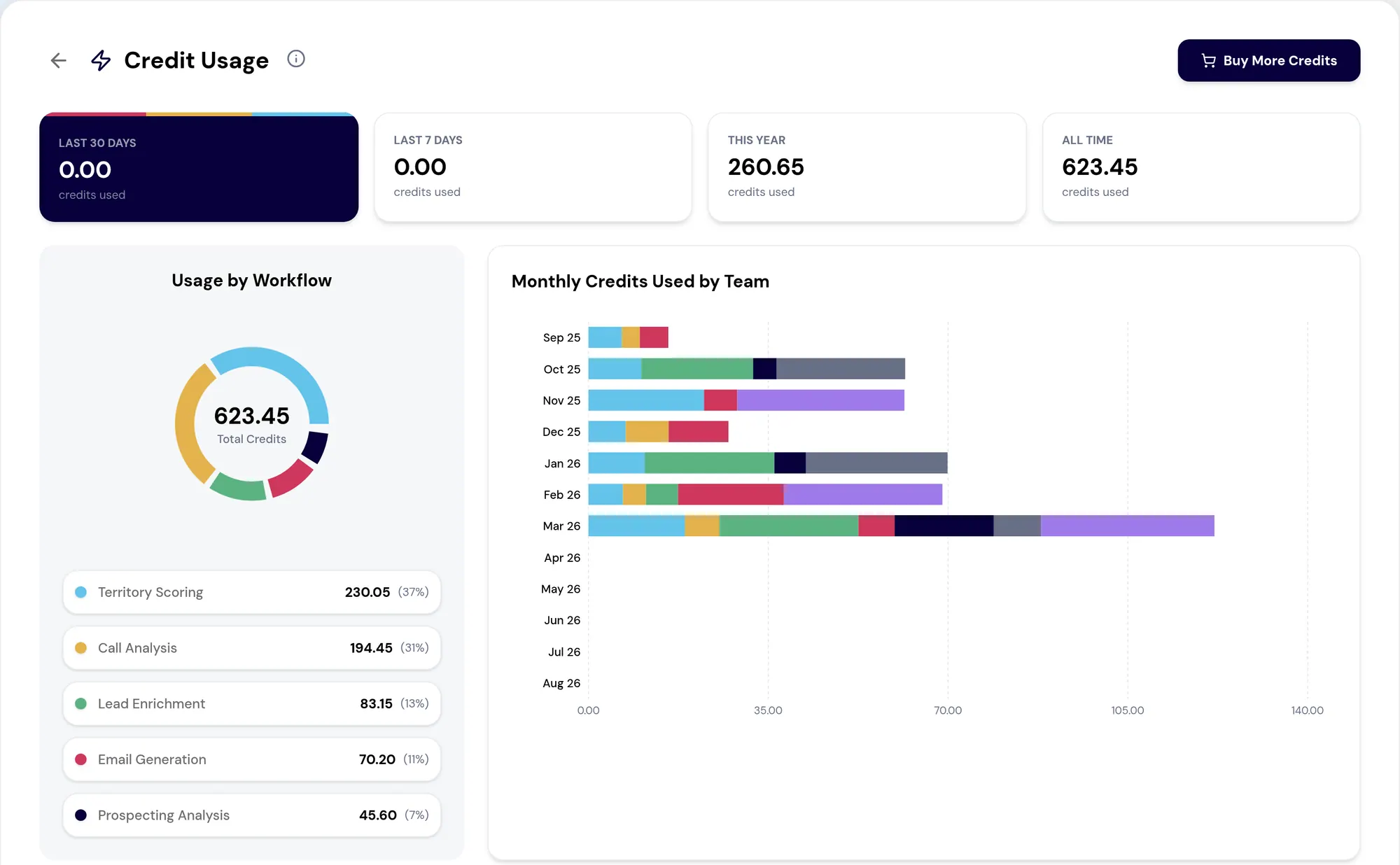
Credit Usage is the diagnostic half — run-level visibility into which workflows, teams and agents are consuming credits, with a trailing twelve-month view by team and a searchable run list for investigating failed or cancelled runs. Its most useful output is spotting the one or two features that dominate the bill, and then deciding whether that concentration is intentional or wants a guardrail.
The quarterly review
None of this is one-time setup. Put a thirty-minute access review on the calendar each quarter and spend it on this page: roles that have accumulated permissions, admins nobody remembers granting, archived users still holding assignments, and custom roles with zero users that should be retired.
The role model only stays useful when it gets revisited. A permission structure designed carefully in month one and never opened again is, by month twelve, a description of an organization that no longer exists.
What to take away
- Order matters: company settings, then CRM, then roles, then teams, then people.
- Scoped record access shapes every other permission in a role. Set it first.
- Granting Manage Roles is a real escalation — that role can edit every other role.
- Archive, do not delete. History is preserved and lockout guards exist for a reason.
- Credit usage tells you which one or two features dominate the bill. Decide whether that is intentional.
Put it to work
Jobs this page is behind
- Forecast and planTrust the ARR bridge“I want to report ARR, retention and NRR from numbers I can defend.”
- Forecast and planShow what the capacity was spent on“I want to answer, with numbers, what we got for running agents.”
- Governance and administrationGet the tenant working in week one“I want to get our workspace set up properly, in the right order, in the first week.”
- Governance and administrationConnect the CRM and keep it current“I want to connect our CRM and be able to tell whether the data is current.”
- Governance and administrationGive each role exactly its access“I want to give every role the access it needs and nothing beyond it.”
- Governance and administrationNever be surprised by the bill“I want to know what agent work costs us and keep it predictable.”
Try the demo.
See agents carry the repeatable work of GTM across sales, marketing, customer success, and RevOps. Every action prepared, reviewed, and recorded. Fictional data, real product.
Explore the demo