Run every play as one portfolio
RevPlay Portfolio shows every play side by side: reach, actions completed and pending, how enrollments ended. Read it, then pause, clone or edit.
The job
“I want to see every motion we are running in one place and decide which to keep, change or stop.”
- RevOps
- Sales leaders
- Marketing leaders
- CS leaders
Plays accumulate. Each one was launched for a reason, and months later the team is running a dozen with nobody reading them together: which reach most of their eligible accounts, which generate more actions than anyone completes, which lose accounts part-way through.
A play read on its own always looks busy. Side by side, the portfolio shows which motions are carrying the work and which are only running. The read should end in something concrete: keep it, change it, copy it to a new segment, or stop it taking new accounts.
What it moves
- Play contribution to KPI
- Action completion rate
- Consistency of execution
The division of labour
What RevTech does, and where you decide
In the product
How to do it
- Step 1 of 5
Read the portfolio cards
Open Reporting → RevPlay Portfolio. It has no period or Team controls: the read is the whole library. Active plays counts what is live out of all plays, Accounts enrolled now sits against the eligible total, and Actions completed and Actions pending are summed across every play.
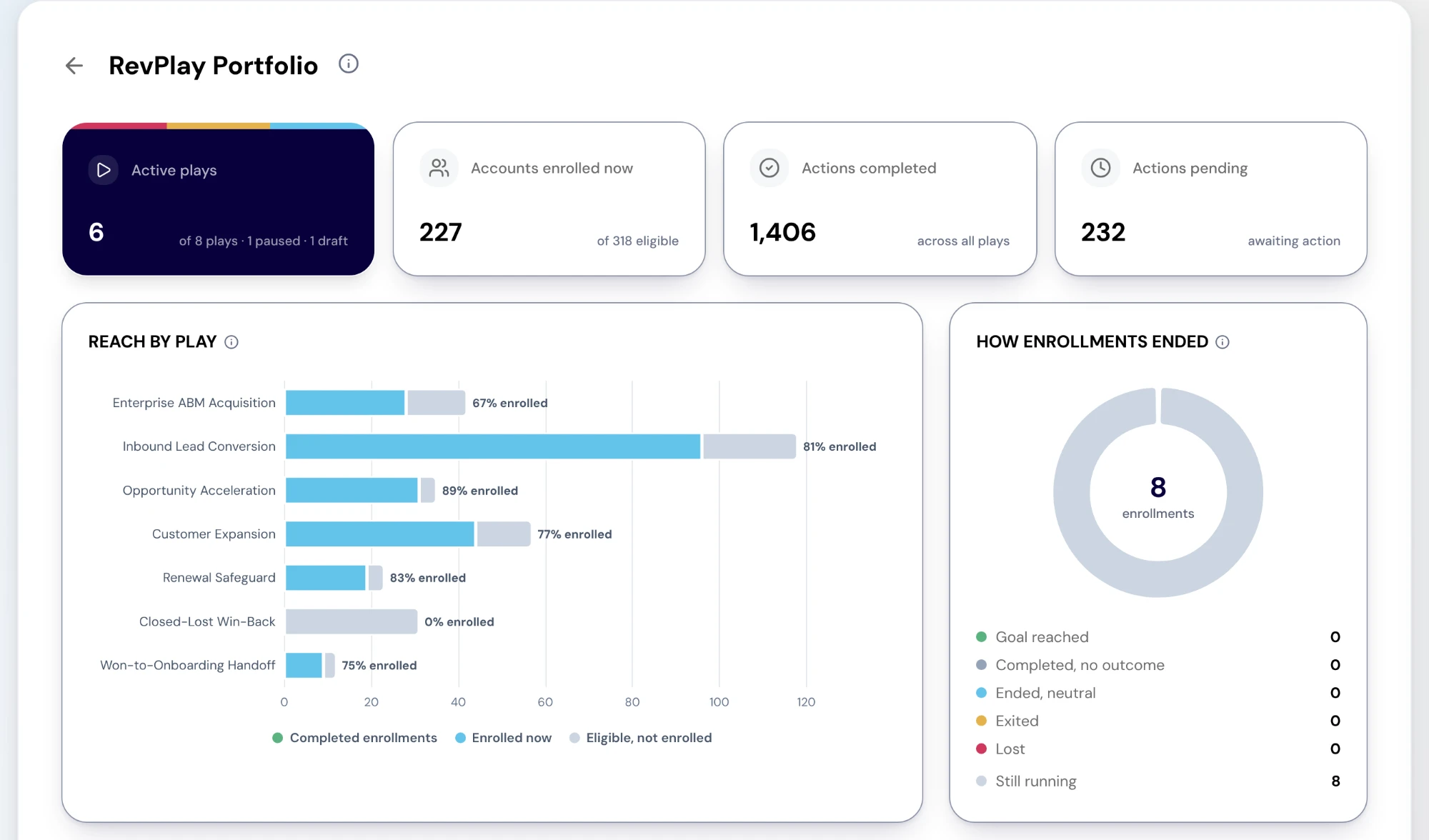
The RevPlay Portfolio report. Cards count active plays, accounts enrolled now, actions completed and actions awaiting work. Charts show reach by play and how enrollments ended. Sample data. Screenshot of the RevTech application; sample data. RevPlay Portfolio in the demo workspace: active plays, accounts enrolled and actions, above reach by play and how enrollments ended. - Step 2 of 5
Compare reach by play
Reach by play shows, for each active or paused play, completed enrollments, accounts enrolled now and eligible accounts not yet enrolled. A long eligible bar beside a short enrolled one is an adoption problem. Select a bar to open that play’s impact.
- Step 3 of 5
Read how enrollments ended
How enrollments ended splits every enrollment into Goal reached; Completed, no outcome; Ended, neutral; Exited; Lost; and Still running. A play where many enrollments exit is losing accounts at a step, and the Plays table’s top exit reason usually names it. Select an outcome to open its accounts.
- Step 4 of 5
Find the play to act on in the table
The Plays table lists each play’s status, eligible, enrolled now, completed, exited, actions done and pending, top exit reason and last update, filtered by status and lifecycle stage. A pending count that keeps rising is a play producing more work than its team completes. View impact opens the play’s own impact page; a draft’s row offers Open RevPlays instead.
- Step 5 of 5
Pause, clone or edit from the library
The decisions are made in AI Agents → RevPlays. Pause stops a live play taking new enrollments, while accounts already in it continue on its published version. Clone opens an unsaved copy in the creation flow, for running the same motion on another segment. Edit changes the play itself. Editing and cloning need revplays:write; pausing needs revplays:publish.
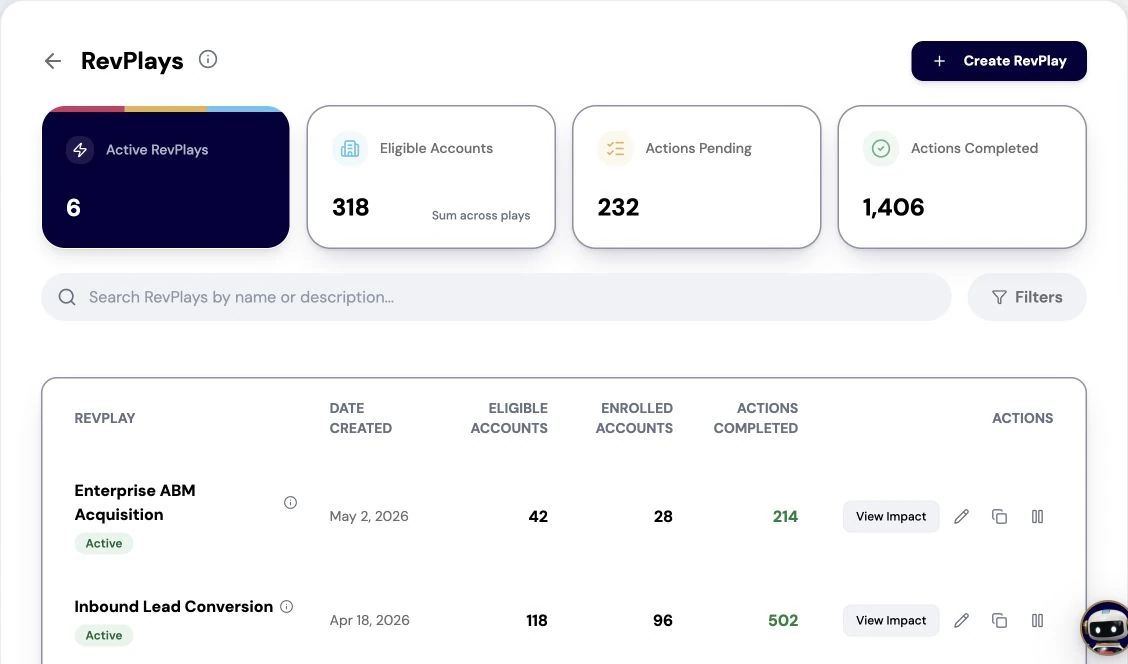
The RevPlays library lists active plays, eligible and enrolled accounts, and completed actions. Captured from the current application with illustrative sample data. Screenshot of the RevTech application; sample data. The RevPlays library, where a play is opened for editing, cloned or paused.
What arrives
What this puts in your Action Center
| Item | What is prepared | How it resolves |
|---|---|---|
| EnrollmentAttention | The signals and the elapsed wait behind a stalled, waiting or blocked enrollment | The account, on its Signals tab; the owner can also complete the current step |
| EnrollmentOutcome | The outcome summary when an enrollment completes or exits | Acknowledge |
| PlayPublishApproval | The version diff and a governance summary | Approve, Request changes or Reject — a recorded decision |
| EnrollmentRecommendation | The eligibility explanation and a recommended owner | Enroll via the play and owner pickers, or reject — which records a sixty-day cooldown |
Where this is today
Outcomes are counted from the enrollment feed, which is not paginated yet, so a very large tenant’s counts may be capped. There is no influenced pipeline per play, and plays carry no owner or type to filter by.
What to take away
- A play read alone always looks busy. Read them side by side.
- Long eligible, short enrolled is adoption. A rising pending count is capacity.
- Many enrollments exiting means a step is wrong. The top exit reason names it.
- Every read ends in keep, change, copy or pause.
Go deeper
The material behind this
See how the work gets done.
Explore how agents prepare work across your revenue teams, and how people review it, guide it and decide what happens next. Fictional data. Real product.
Explore the demo