Know whether this quarter is building the next
New Pipeline Created shows what was created by week and by owner. Set it against the gap, check the sources, then aim a campaign or a play at the shortfall.
The job
“I want to see whether we are creating enough pipeline now to make next quarter.”
- Marketing leaders
- Marketing
- Sales leaders
- RevOps
Next quarter’s number is mostly decided by the pipeline created this quarter, and by the time a coverage shortfall shows up in the forecast it is usually too late to create the deals that would fix it. The early read is creation: how much new pipeline arrived this period, from whom, and whether that pace is enough.
That read is only useful if it ends in a move. A shortfall seen early in the quarter is a campaign or a play you can still launch. The same shortfall seen in the last week is an explanation.
What it moves
- Pipeline created
- Account engagement to pipeline
- Pipeline coverage quality
The division of labour
What RevTech does, and where you decide
In the product
How to do it
- Step 1 of 5
Read what was created
Open Reporting → New Pipeline Created and set Team, Fiscal Year and Quarter in the header. The cards give New pipeline, Deals created, Avg new deal and New accounts for the period.
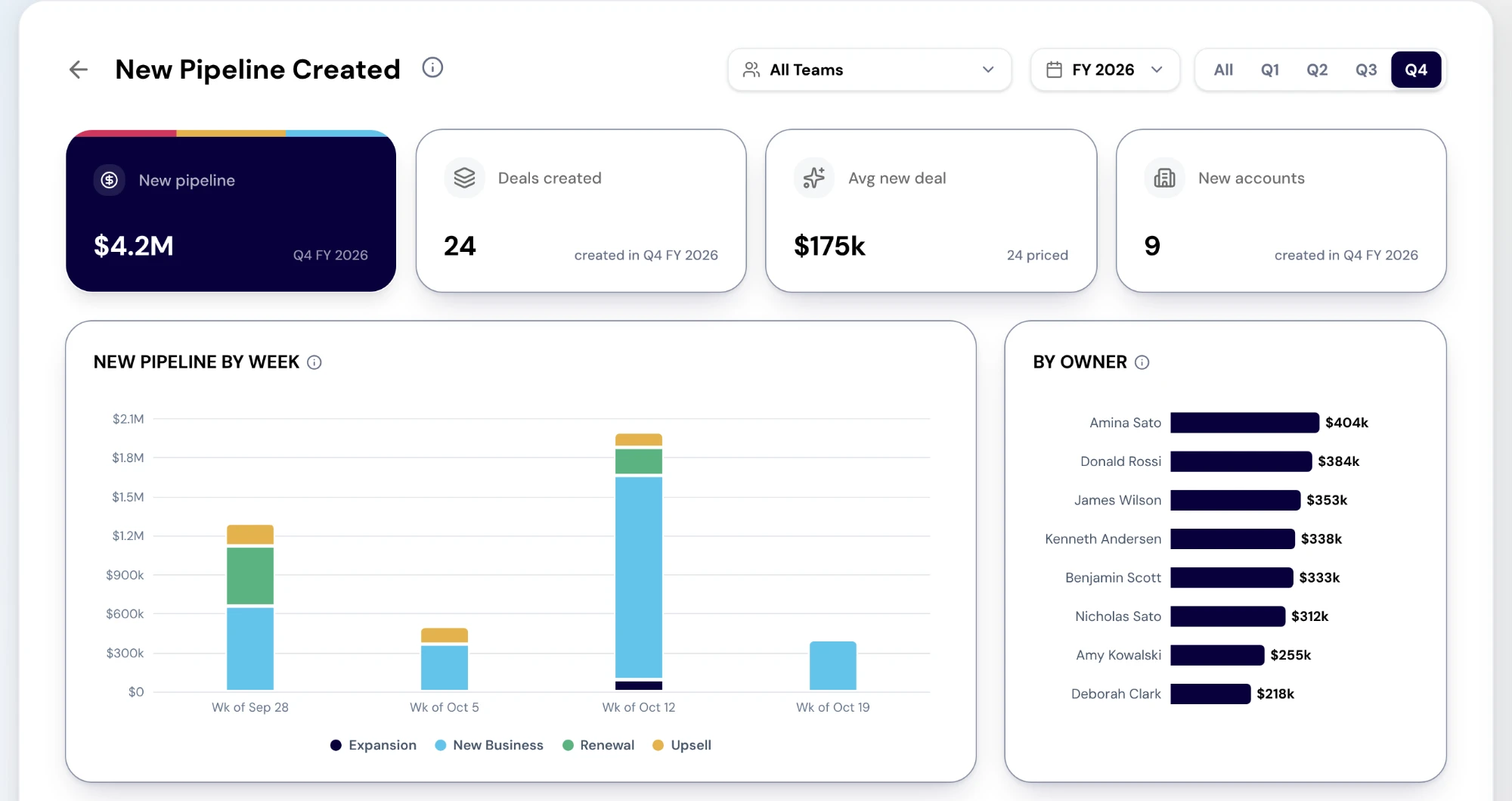
The New Pipeline Created report. Cards summarise the pipeline created in the period. Charts show new pipeline by week and by owner, with the deals listed below. Sample data. Screenshot of the RevTech application; sample data. New Pipeline Created in the demo workspace: new pipeline, deals and accounts created, above new pipeline by week stacked by deal type. - Step 2 of 5
Look at the shape by week and by owner
New pipeline by week stacks each week by deal type, so a quarter built on one good week looks different from a steady one. By owner ranks the people creating it; select an owner to open their rep page, or their new deals when the sales roster does not know them. The New deals table lists every deal with owner, type, stage, amount and the date it was created.
- Step 3 of 5
Set it against what you need
The report shows what was created, not what was needed. Need comes from the target: Gap to Target gives the remaining gap and how many times open commit and upside cover it, and Pipeline Coverage weighs open pipeline against the forecast and the quota. If open pipeline does not cover the gap, the creation pace is the number to change.
- Step 4 of 5
Check where the open pipeline comes from
Pipeline Source splits the open pipeline closing in the period by lead source, with win rate against sales cycle per source in Source quality. It tells you which sources feed the book you are forecasting from, which is the read to use for where to invest, since New Pipeline Created cannot split by source yet.
- Step 5 of 5
Aim a campaign or a play at the shortfall
A shortfall ends in a motion, not a slide. Launch a campaign against the segment that is under-producing, or enroll the accounts that are warming into a play. Accounts whose engagement crosses into the hot band arrive in the Action Center already matched to qualifying plays.
What arrives
What this puts in your Action Center
| Item | What is prepared | How it resolves |
|---|---|---|
| AccountScoreImproved | The account matched to qualifying plays | Enroll in a play while momentum holds |
| EnrollmentRecommendation | The eligibility explanation and a recommended owner | Enroll via the play and owner pickers, or reject — which records a sixty-day cooldown |
| CampaignLive · CampaignEnded | Scored attendees and a shortlist of sales-ready leads | Open the campaign |
Where this is today
New Pipeline Created reaches back 90 days and dates a deal by when RevTech first synced it, not the CRM create date, so just after the CRM is connected the whole book reads as new; an older period shows an empty state that says so. It has no source split yet.
What to take away
- Creation this quarter is next quarter’s coverage. Read it early.
- The report shows what was created. The gap tells you what was needed.
- Read sources from Pipeline Source, not from New Pipeline Created.
- A shortfall ends in a campaign or a play, while there is still time for either.
Go deeper
The material behind this
See how the work gets done.
Explore how agents prepare work across your revenue teams, and how people review it, guide it and decide what happens next. Fictional data. Real product.
Explore the demo