Never miss a renewal date
Renewal Calendar puts every renewal deal on a month calendar, with the overdue ones and those on at-risk accounts counted. Work from it, then from the brief.
The job
“I want to see every renewal on a calendar and start each one before its date arrives.”
- Customer success managers
- CS leaders
- Account managers
Renewals are rarely lost on the day. They are lost in the weeks before, when nobody started the conversation because the date was not in front of anyone. A renewal book kept in a spreadsheet is accurate on the day it is built and wrong a week later.
A calendar read from the CRM fixes the first half of that: every renewal deal sits on its close date, and the overdue ones and the ones on at-risk accounts are counted for you. Starting early is still a person’s call, and the brief that arrives when an account enters its renewal window is what makes starting early cheap.
What it moves
- Renewal risk surfaced
- Time to risk action
- Gross revenue retention
The division of labour
What RevTech does, and where you decide
In the product
How to do it
- Step 1 of 5
Open the calendar for your period
Open Reporting → Renewal Calendar and set Team, Fiscal Year and Quarter in the header. The cards give Open renewals, Overdue renewals (past their close date), the open renewals On at-risk accounts, and what has Renewed, with the renewal rate.
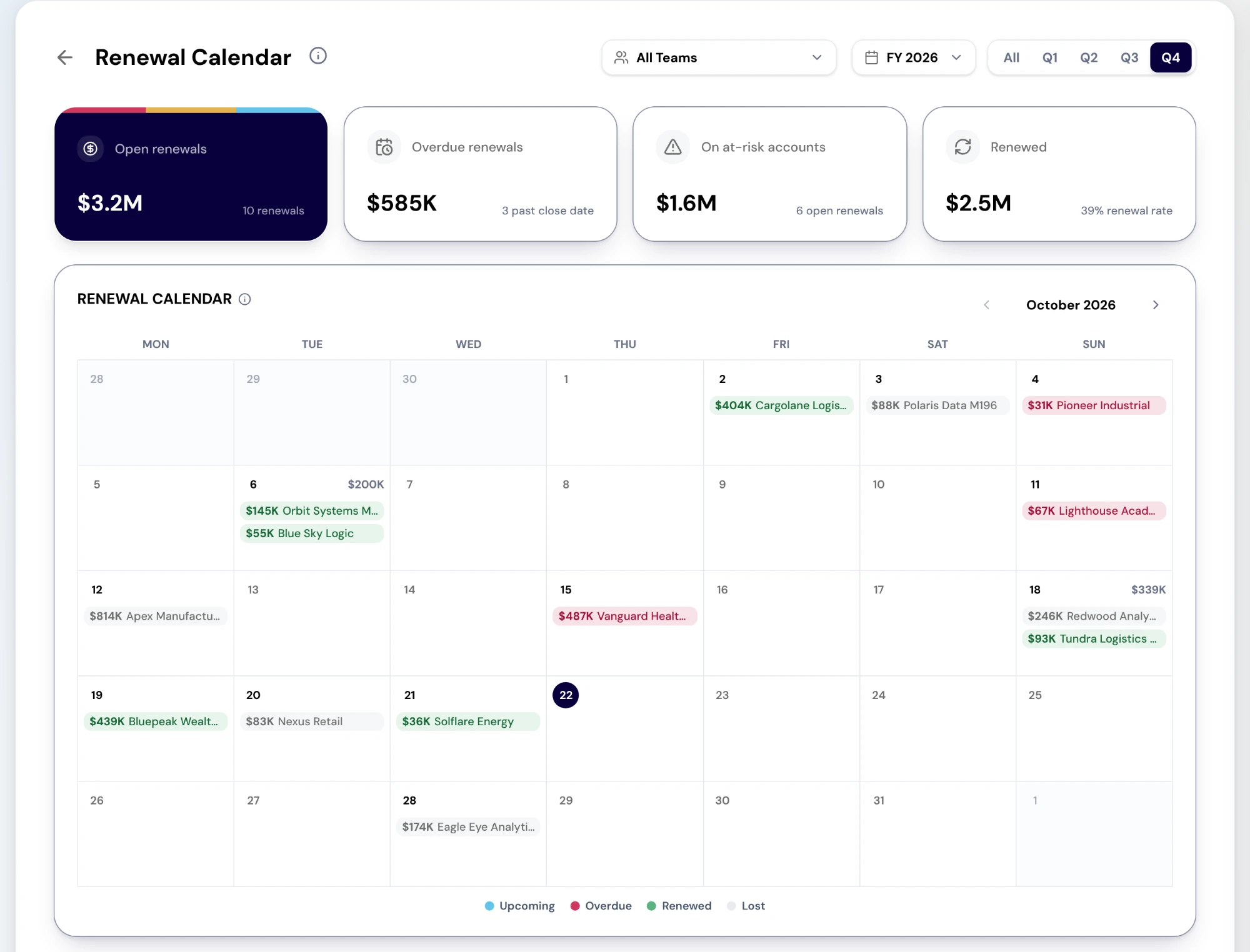
The Renewal Calendar report. Cards count open renewals, overdue renewals, renewals already won and renewals on at-risk accounts. Below, a month calendar places each renewal on its date with its value, and can be moved month to month. Sample data. Screenshot of the RevTech application; sample data. Renewal Calendar in the demo workspace: the four cards above a month of renewals, each on its close date and tinted by status. - Step 2 of 5
Work the month, then the day
Each renewal sits on its close date, tinted by status, with today marked. Step through the months of the period with the arrows. Select a renewal to open the deal, or a day to list everything renewing on it.
- Step 3 of 5
Clear the overdue ones first
An overdue renewal is one whose close date has passed while the deal is still open. Either the customer renewed and the CRM was not updated, or the renewal is genuinely late. Both need an answer this week, and the first is a quick fix that keeps every other number honest.
- Step 4 of 5
Use the renewal book to plan the quarter
Below the calendar, the Renewal book lists the period’s renewal deals with owner, amount, forecast category, stage and close date, filtered from the side panel. Where Customer Health knows the account, its name and health show under the deal; select the account to open it.
- Step 5 of 5
Start from the brief when it arrives
When an account enters its renewal window, a card arrives with the brief: usage trend, value recap and risk flags. A health drop arrives separately with an intervention plan. Read the brief, add what it cannot know, and put the first conversation in your calendar by risk rather than by renewal date.
What arrives
What this puts in your Action Center
| Item | What is prepared | How it resolves |
|---|---|---|
| RenewalDue | The brief: usage trend, value recap, risk flags | The account |
| HealthRisk | An intervention plan: a new-champion map and an executive agenda | The account |
Where this is today
The calendar shows renewal deals only: a contract end date with no renewal deal in the CRM does not appear yet. Account names and health come from the Customer Health tiers, so a renewal on an account Customer Health does not know shows without them.
What to take away
- Clear the overdue renewals first. Some of them are only CRM updates.
- If it is not a renewal deal in the CRM, it is not on the calendar.
- The renewal date is the deadline. The brief is the start.
- Set the first conversation by risk, not by date.
Go deeper
The material behind this
See how the work gets done.
Explore how agents prepare work across your revenue teams, and how people review it, guide it and decide what happens next. Fictional data. Real product.
Explore the demo