Hear about a forecast change before the call
When a rollup moves materially, the card names which deals moved it. The difference between reacting on Monday and explaining on Friday.
The job
“I want to find out the forecast moved when it moves, not at the weekly meeting.”
- Sales leaders
- RevOps
- Finance
Executives see GTM performance late. Not because the reporting is bad, but because reporting is something you go and look at, and nobody goes and looks at a report on the Tuesday when the thing that matters happens. The move gets discovered on Friday, which is four days of intervention window spent.
The gap between when a number changes and when a person hears about it is the single clearest measure of how fast an organisation can respond, and it is almost entirely a function of whether change is pushed or pulled.
What it moves
- Forecast variance
- Executive intervention speed
- GTM operating latency
The division of labour
What RevTech does, and where you decide
In the product
How to do it
- Step 1 of 4
Know the two levels of forecast card
They are easy to confuse and they answer different questions. A forecast category change is about one deal moving between Commit and Upside, and it opens that deal. A forecast change is about a report whose rollup moved materially, and it opens that specific report — never the reporting hub, because "something moved, go and look" is the problem rather than the answer.
- Step 2 of 4
Read which deals moved it before forming a view
The card carries the recomputed rollup and the deals responsible. That is the whole value: a number that fell is a fact, and the three deals that made it fall is a decision. One large deal slipping a week and eleven small ones stalling are the same delta and completely different problems.
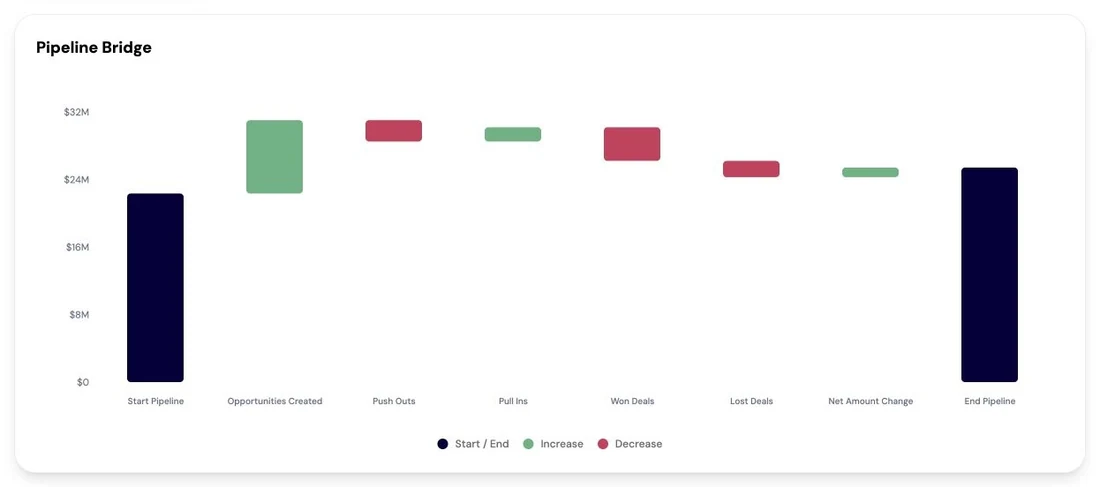
Pipeline movement compared period over period, covering created, advanced, won and lost, showing what actually changed. Screenshot of the RevTech application; sample data. The movement behind a rollup, rather than the rollup on its own. - Step 3 of 4
Take the analyst delta as the second read
When a standing analyst question re-runs and its answer changes, the card highlights the delta rather than handing you a fresh answer to compare from memory. For the questions that bear on the number — whether the quarter will be hit, what is driving revenue — that delta is the early warning that a trend has turned rather than wobbled.
- Step 4 of 4
Decide what is worth a message
Not every movement is an intervention. The judgement that matters is which of these you pass on and which you let the weekly call handle, and it depends on whether anybody can still do something. A slip you hear about on Tuesday is workable; the same slip on Friday is a re-forecast.
What arrives
What this puts in your Action Center
| Item | What is prepared | How it resolves |
|---|---|---|
| ForecastChange | The recomputed rollup and which deals moved it | That specific report |
| ForecastCategoryChange | The recomputed rollup impact of one deal changing category | The deal, on its Journey tab |
| AnalystQuestionUpdate | The re-run analysis, with the change from the previous answer highlighted | That question’s refreshed answer |
| ReportUpdate | The regenerated report | That specific report |
Where this is today
Which reports and questions produce these cards is decided by the platform rather than by a control in the product — there is no "follow this report" button to press. If a report that matters to you is not producing them, that is a conversation with RevTech rather than a setting you have missed.
What to take away
- A category change is one deal. A forecast change is a rollup. They open different places for a reason.
- The deals that moved it are the point. The delta alone is not a decision.
- An analyst delta tells you a trend turned, rather than handing you a number to compare from memory.
- The test for passing something on is whether anybody can still act on it.
Go deeper
The material behind this
See how the work gets done.
Explore how agents prepare work across your revenue teams, and how people review it, guide it and decide what happens next. Fictional data. Real product.
Explore the demo