Re-open a closed-lost account on a signal
Win-back is a motion, not a quarterly list. Make losing a lifecycle state a play can watch, and re-engage on evidence.
The job
“I want to re-engage the accounts we lost, at the moment something has actually changed.”
- Sales reps
- Marketing
- RevOps
Closed-lost is the largest well-qualified audience most companies have and the one they work least. Everybody in it has been through an evaluation, so the expensive education is already paid for; what was missing was budget, timing, a champion, or a capability that has since shipped.
The reason it goes unworked is that the trigger is invisible. Nobody knows the month the new VP arrives or the budget unfreezes, so win-back becomes a quarterly list that gets called down with a generic message — which performs exactly as badly as it deserves to, and then gets cancelled.
What it moves
- Pipeline created
- Win rate
- Cost per opportunity
The division of labour
What RevTech does, and where you decide
In the product
How to do it
- Step 1 of 4
Make lost a state, not an ending
A play’s eligibility is a standing condition over account properties, and lifecycle is one of them. A win-back play whose eligibility includes the lost lifecycle plus a signal condition keeps watching, which is the difference between a motion and a list somebody exports.
- Step 2 of 4
Pick signals that mean something changed
Not all activity is a reason to call. Renewed engagement from a new person, a return to your pricing pages, or an account score crossing back into the hot band are all evidence that the situation is different. Time elapsed alone is not evidence, and a play triggered on it is a quarterly list wearing a costume.
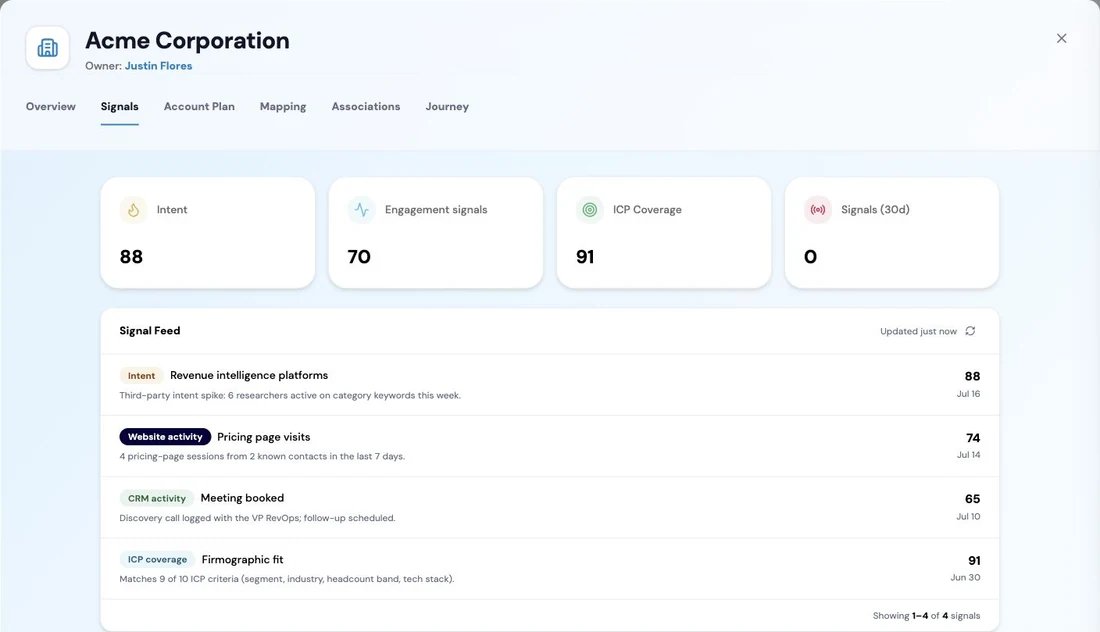
Buying signals collected on an account. Intent and engagement scores, how well the account matches the ideal customer profile, and activity volume plotted across the year: the demand evidence that decides whether an account is worth working now, held on the account record itself rather than in a separate tool. Screenshot of the RevTech application; sample data. Signals on an account. A win-back motion should be watching these rather than a date. - Step 3 of 4
Open with the reason you lost
The loss reason on the original deal is the most useful sentence in the re-engagement, because it names what would have to have changed. A win-back message that does not reference it is a cold email to somebody who already knows you.
- Step 4 of 4
Enrol, and respect the cooldown
An eligible account arrives as an enrolment recommendation with the reasoning and a recommended owner. Rejecting one records a sixty-day cooldown, which is the mechanism that stops a win-back motion becoming the thing that annoys your lost accounts into never coming back.
What arrives
What this puts in your Action Center
| Item | What is prepared | How it resolves |
|---|---|---|
| AccountSignal | The correlated signals for the account, with the full set attached as evidence | The account, on its Signals tab |
| AccountScoreImproved | The account matched to the plays it now qualifies for | Enrol in a play while the momentum holds |
| EnrollmentRecommendation | The eligibility explanation and a recommended owner | Enrol, or reject — which records a sixty-day cooldown |
Where this is today
The Signals tab on the account record is not switched on in a production tenant yet, so the signal evidence is read from the cards rather than from that tab. The plays, the eligibility conditions, the enrolment recommendations and the cooldown all work as described.
What to take away
- Lost is a lifecycle state a play can watch, not an ending.
- Time elapsed is not a signal. Something has to have actually changed.
- Open with the loss reason. It names the thing that would have to be different.
- The sixty-day cooldown on a rejection is what keeps the motion from wearing out the audience.
Go deeper
The material behind this
See how the work gets done.
Explore how agents prepare work across your revenue teams, and how people review it, guide it and decide what happens next. Fictional data. Real product.
Explore the demo