Slide 1 of 4
The quarter in context
A QBR compares the quarter with the year before, the plan and the book. Each comparison has its own report.
Build the quarterly read from Quarter & Year Trends, Top Accounts, Bookings and Recurring Revenue, use RevPlay Portfolio to decide which motions to keep, and end the QBR with target and motion decisions.
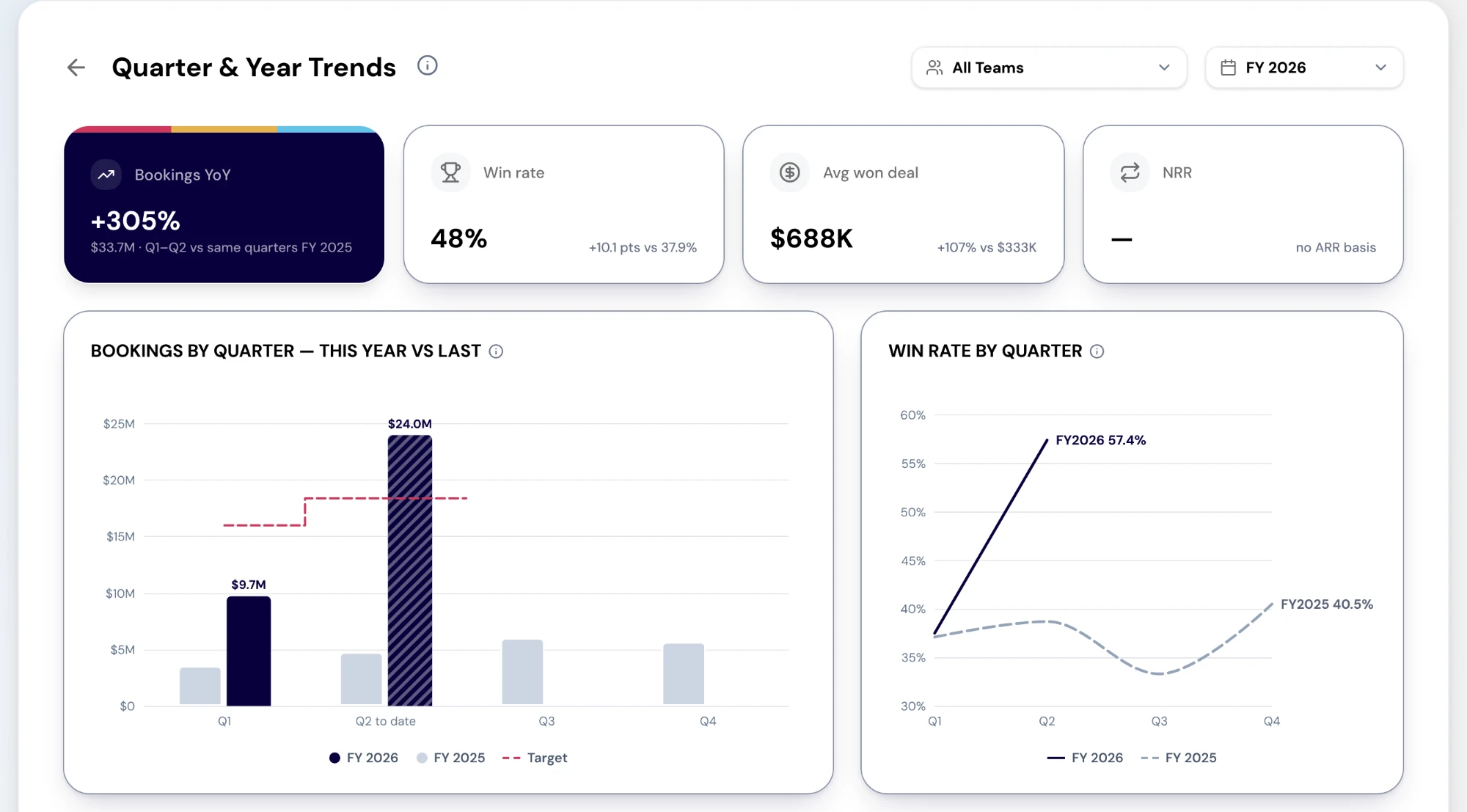
Quarter & Year Trends sets each quarter of the fiscal year beside the same quarter a year earlier, and shows only measures that stay true for a past period: bookings against target, attainment, win rate, average won deal and won deals. Its cards are Bookings YoY, win rate and average won deal; the charts are bookings by quarter this year against last, and win rate by quarter. Open pipeline and pipeline created are left out on purpose, because the platform can only state them as of today. NRR has a card here too, and it shows a dash in a production tenant.
Bookings is the plan view: progress, weighted pipeline and new business against the year's target, with a Coverage card that adds progress to weighted pipeline and divides by target. It is arithmetic, not a probability of hitting the number. Recurring Revenue shows how ARR moved across the period in a bridge (new and expansion in, contraction and churn out) and how much of it sits in the top tenth of customers. ARR on both Recurring Revenue and Retention is implied from won deals, each counted for twelve months, until contract fields are mapped.
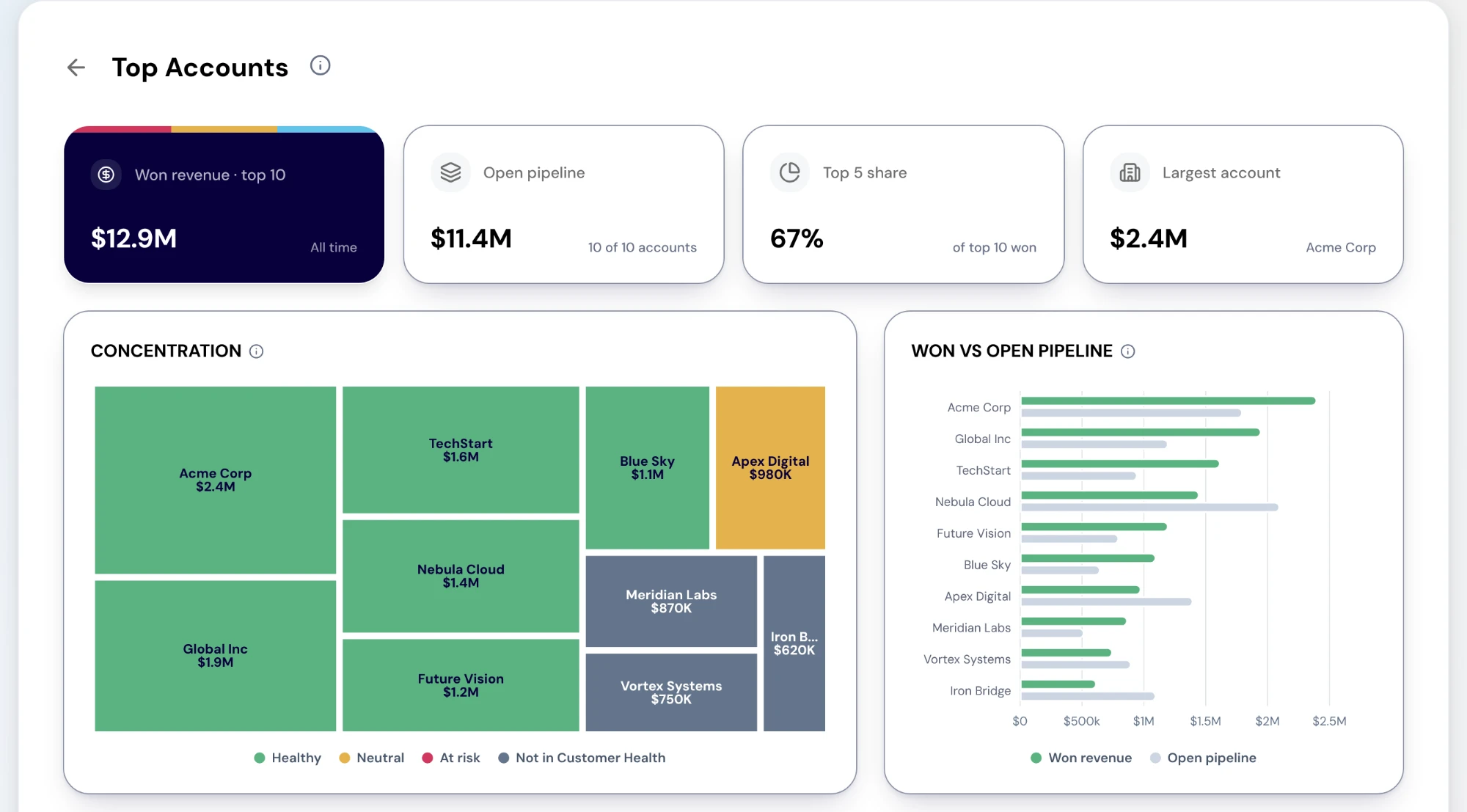
Top Accounts ranks your largest accounts by all-time won revenue, with their open pipeline and health. Its cards are won revenue across the top accounts, open pipeline, the top 5 share and the largest account; the concentration chart and the won-against-open-pipeline bars sit above the ranked list. Select an account to open it.
Read the top 5 share with its limits in mind. The ranking is all-time, with no period or team filter yet, and the share is of the top 25 accounts' won revenue, not of your whole book. It is still the fastest honest answer to "how dependent are we on a few customers", and a rising share is a QBR topic whatever the quarter's number was.
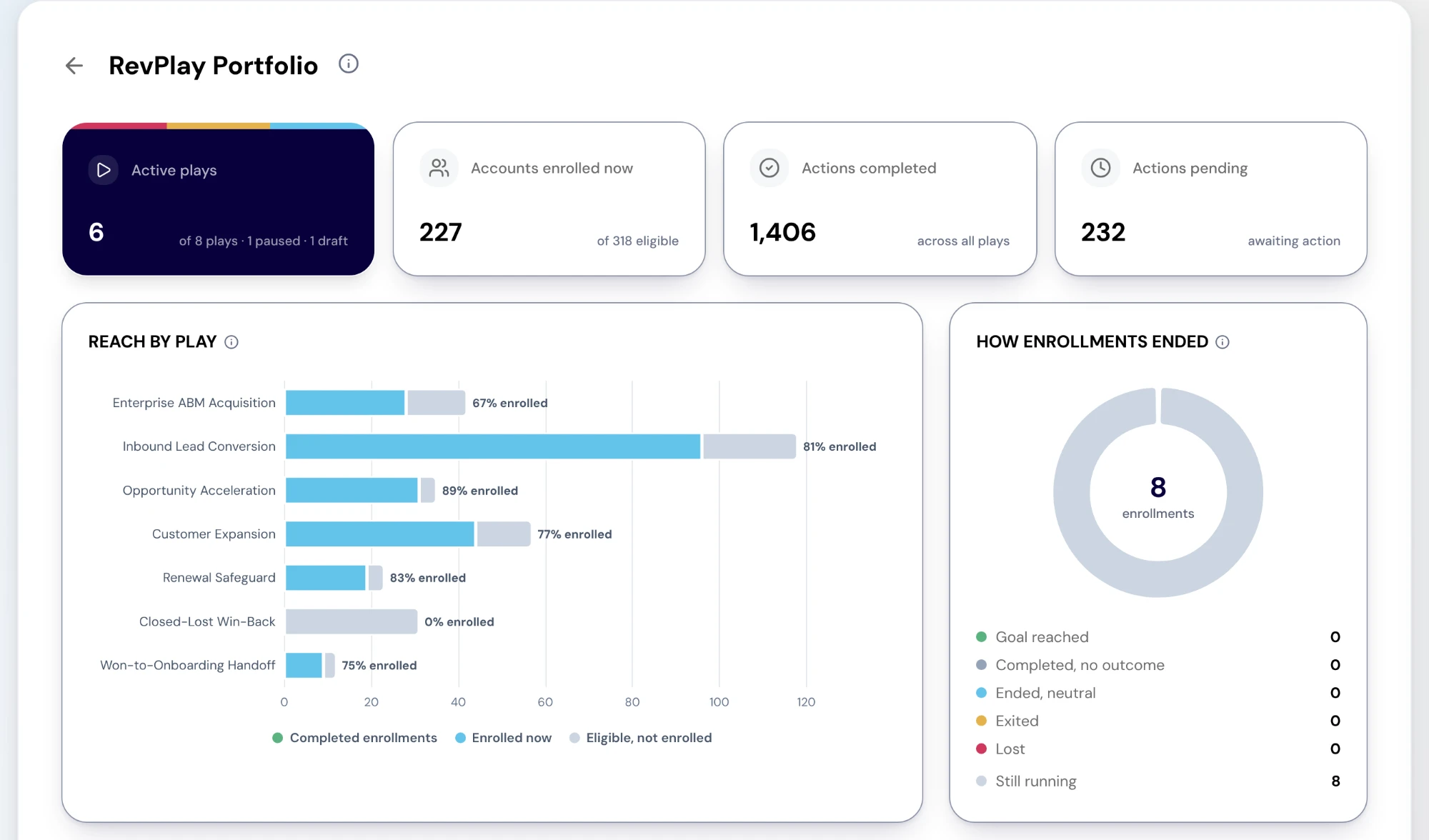
A QBR that reviews only outcomes leaves the motions that produced them untouched. RevPlay Portfolio is the motion view: active plays, accounts enrolled now, and actions completed and pending as cards, reach by play, how enrollments ended (goal reached, completed with no outcome, ended neutral, exited, lost or still running) and the Plays table with each play's top exit reason. Select a play's bar in Reach by play to open its impact.
Use it to sort every running play into keep, change or stop. A play whose enrollments mostly exit for the same reason needs changing; one whose pending actions keep climbing is outpacing the team; one that runs well but has not moved its KPI after a full cycle should stop being reported against that KPI. The report does not show pipeline influenced by each play yet, so read outcomes and execution, not attribution.
Three decisions, written down before the meeting ends. Targets for next quarter, changed in Goals & Targets if the trend, the plan or the pipeline review says they should be. The motions to keep, change and stop, with owners. And a plan for the accounts the book depends on: an account plan for each account in the top tier that lacks one, and an expansion or retention play where concentration is rising.
For a board read, carry the same reports and the same caveats. A board is better served by "NRR is not measured yet, and here is gross retention" than by a number nobody can defend.
Do this in the product
You should be able to answer each of these from memory before opening it. Recalling the answer is what makes it stick; recognizing it when you read it does not.
Because the platform can only state them as of today, not as they stood in a past quarter. The report shows only measures that stay true for a past period, so the year-on-year comparison is fair.
Of the won revenue across the top 25 accounts, all time, with no period or team filter. It is not a share of your whole book, so say so when you quote it.
The motions behind the number. It sets every play side by side on reach, how enrollments ended and actions done and pending, so the QBR can decide which motions to keep, change or stop.
A QBR compares the quarter with the year before, the plan and the book. Each comparison has its own report.
RevPlay Portfolio sets every play side by side, so the QBR can decide which motions to keep, change or stop, not just how the number came out.
Target changes for next quarter, the motions to keep and stop, and a plan for the accounts the book depends on.
Explore how agents prepare work across your revenue teams, and how people review it, guide it and decide what happens next. Fictional data. Real product.
Explore the demo