Launch a campaign whose collateral arrives written
Five steps from brief to review, with landing pages and solution briefs drafted per account. The review load is the thing to size first.
The job
“I want to run a campaign without the content backlog deciding what we can run.”
- Marketing
- Demand generation
- Marketing operations
For most teams the marketing calendar is set by production capacity rather than by strategy. The campaign that would work best is the one requiring forty pieces of per-account collateral, so the campaign that runs is the one requiring four, and everybody understands this is a compromise without saying so.
When the drafting is carried, the binding constraint moves to review. That is a real constraint too, and the mistake teams make is not noticing it has moved — generating four hundred assets and discovering that nobody has time to read them is a worse position than not generating them.
What it moves
- Campaign throughput
- Campaign follow-up completion
- Cost per opportunity
The division of labour
What RevTech does, and where you decide
In the product
How to do it
- Step 1 of 5
Name it, then work the five steps
Creating a campaign opens a modal that names it and places it in a program. After that the builder carries five steps with clickable breadcrumbs: Strategy, Audience, Content, Associations, Review.
- Step 2 of 5
Keep prose in the brief and numbers in the objectives
The Strategy step collects two different things and they are easy to confuse. The brief is rich text describing the goal, the messaging and the audience, and it is what the drafting is written against. The objectives are numeric targets, and they are what the campaign gets judged against later. Prose in the objectives is a measurement problem; numbers in the brief is a copy problem.
- Step 3 of 5
Decide campaign-level or per-account deliberately
That one choice multiplies your review load, your credit cost and your specificity together. Per-account collateral is the reason to use this at all, and it is also the thing that produces four hundred assets. Choose it where the specificity earns its review.
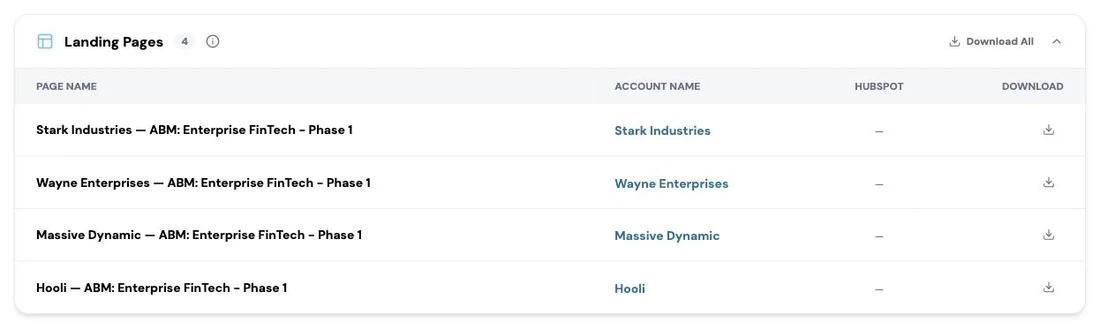
The assets tab of a campaign. RevTech drafts the collateral the campaign needs, from a landing page per target account to solution briefs and ad copy, and lists each one with the account it was written for, a link to push it into HubSpot and a download for any other system. The agent produces the first draft; a marketer decides what ships. Screenshot of the RevTech application; sample data. Drafted collateral on a campaign. Per-account is where the value and the review load both are. - Step 4 of 5
Approve the priced job
Approving generation opens a dialog that prices this exact job from the server: what is included, how many account plans it will also generate, the total, and your available credits. Approving accepts that amount. Save Draft is a separate operation that creates no work and costs nothing.
- Step 5 of 5
Sample the output, then fix upstream
Do not read four hundred assets. Read a deliberate sample, and treat what you find as a map of where your artifact library is thin — vagueness in a draft is almost always a missing input rather than a drafting failure. Fixing the pattern fixes the batch.
What arrives
What this puts in your Action Center
| Item | What is prepared | How it resolves |
|---|---|---|
| CampaignApproval | The drafted brief, the generated variants and the built audience, staged for sign-off | Review only in a production tenant |
| AccountAssetReview | An asset written against one account’s own context, for the person who owns that account | The artifact itself |
Where this is today
Campaign sign-off arrives as a Review only item in a production tenant: the brief, the assets and the audience are all there to read, but the approve or reject decision is not recorded by the platform yet. Demo and staging builds simulate the decision, so a demo will show you a flow your first production tenant will not have.
What to take away
- Brief is prose, objectives are numbers. Confusing them costs you the copy or the measurement.
- Per-account multiplies specificity, cost and review load in one choice.
- The approval dialog prices the job. Approving accepts that exact amount.
- Sample the output and fix the library, not the instance.
Go deeper
The material behind this
See how the work gets done.
Explore how agents prepare work across your revenue teams, and how people review it, guide it and decide what happens next. Fictional data. Real product.
Explore the demo