Turn campaign responders into owned follow-up
The gap between a campaign ending and anybody calling is where most campaign value is lost. Two cards and a bulk action close it.
The job
“I want to get the people who engaged with a campaign into somebody’s hands this week.”
- Marketing
- Business development
- Sales managers
Campaign follow-up is the highest-value work in demand generation and it is structurally orphaned. Marketing’s job is over when the campaign ends; sales’ job has not started because nothing has been assigned; and the list of attendees sits in an export that gets smaller every day it is not worked.
The window is days. An event follow-up in week one is a conversation about something the person remembers; the same follow-up in week four is a cold call with an awkward premise.
What it moves
- Campaign follow-up completion
- Speed to lead
- Pipeline created
The division of labour
What RevTech does, and where you decide
In the product
How to do it
- Step 1 of 4
Take the lifecycle cards seriously
A campaign reaching live or finished raises a card, and it is not an announcement — it arrives with the attendees scored and the sales-ready ones shortlisted. The shortlist is the thing to act on the same day.
- Step 2 of 4
Work from the campaign’s own account list
The campaign detail carries its accounts with audience counts, open pipeline, audience contacts and known owners. Known owners is the column to read first: it tells you how much of this list already belongs to somebody and how much is genuinely unassigned.
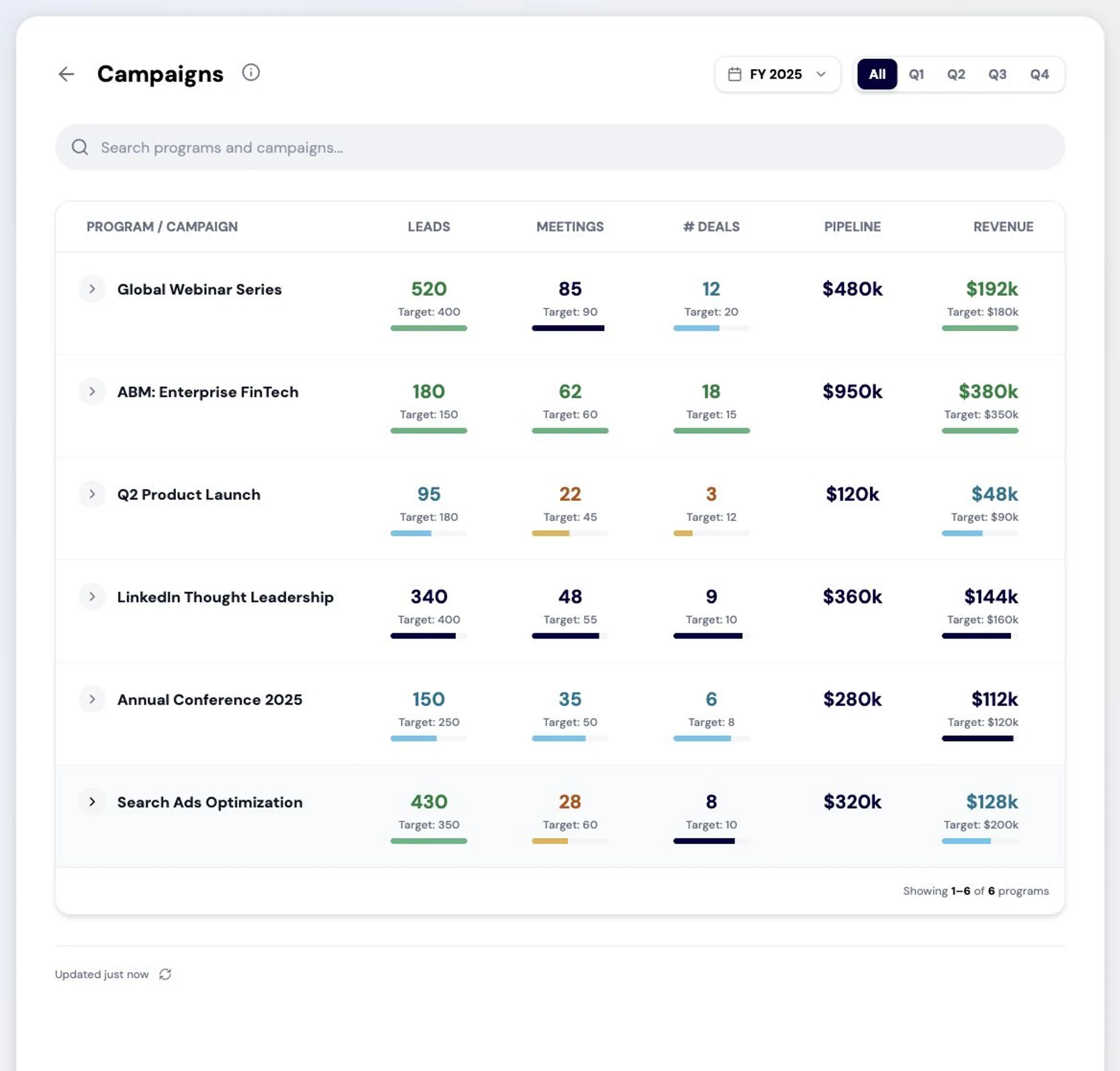
Every campaign in one view. Each program and its child campaigns are reported on the same terms of leads, meetings, deals, pipeline and revenue, so marketing can see which demand became business rather than which campaign was busiest. Screenshot of the RevTech application; sample data. Campaigns and the accounts underneath them. Ownership is the column that decides the follow-up plan. - Step 3 of 4
Enrol in bulk rather than exporting
Selecting accounts or contacts and adding them to a play puts the follow-up into the owners’ queues as timed steps, which is a different thing from a list emailed to a sales manager. The export has no owner and no deadline; the enrolment has both.
- Step 4 of 4
Read attainment against the objective you set
When a campaign hits its configured target a card carries the authoritative attainment. Read it against the numeric objectives from the Strategy step rather than against the volume it produced — a campaign that generated a great many leads and missed its meetings objective did not work.
What arrives
What this puts in your Action Center
| Item | What is prepared | How it resolves |
|---|---|---|
| CampaignLive · CampaignEnded | Attendees scored and sales-ready leads shortlisted | Opens the campaign |
| CampaignTargetHit | The authoritative attainment read | The campaign overview |
| EnrollmentRecommendation | The eligibility explanation and a recommended owner | Enrol, or reject — which records a sixty-day cooldown |
What to take away
- The finished-campaign card carries a shortlist, not an announcement. Act on it the same day.
- Known owners tells you what proportion of the list is genuinely unassigned.
- An enrolment has an owner and a deadline. An export has neither.
- Judge the campaign against its objectives, not against its volume.
Go deeper
The material behind this
See how the work gets done.
Explore how agents prepare work across your revenue teams, and how people review it, guide it and decide what happens next. Fictional data. Real product.
Explore the demo