Turn a motion into something repeatable
Four steps from a purpose to an activated play: overview, timeline and actions, eligibility and goal, review and activate.
The job
“I want to take the motion my best rep runs from memory and have everybody run it.”
- RevOps
- Sales leaders
- Marketing leaders
Every revenue team has motions that work and exist only in somebody’s head. They are visible in that person’s numbers and invisible everywhere else, and the standard response — writing them into a playbook document — reliably produces a document nobody opens.
The difference between a documented motion and a running one is whether the steps arrive as work. A play is the version where they do: the same sequence, for every qualifying account, landing in the right person’s queue on the right day.
What it moves
- Consistency of execution
- Coverage without headcount
- Play contribution to KPI
The division of labour
What RevTech does, and where you decide
In the product
How to do it
- Step 1 of 6
Choose a motion that deserves to be one
The test is repeatability: stable inputs, a visible owner, an output somebody can inspect. A motion that requires a different judgement every time should stay a judgement. Trying to encode one is how playbooks acquire a reputation for being wrong.
- Step 2 of 6
Overview: name, purpose, stages, KPI
The first step carries the play’s identity and, importantly, the KPI it is meant to move. That link is what makes the impact report possible later, and it is much harder to add convincingly after the fact.
- Step 3 of 6
Timeline and actions: lay it out in days
The motion is a timeline rather than a chain of triggers, and each step carries actions with instructions an agent can prepare against and a role that should hold them. Day-based steps are easier to reason about than trigger chains, and they match how the humans in the motion already think.
- Step 4 of 6
Eligibility and goal: who this is for
Eligibility is a standing condition over account properties rather than a list you select. Accounts keep becoming eligible while the play is active, which is the property that makes it a motion. Start deliberately narrow and widen once it has proven itself.
- Step 5 of 6
Review and activate: read it whole
The last step lays the motion out in order, which is the only point at which certain errors become visible. Anything required and still missing is listed beside the Activate control, each blocker linking to the step that needs it. There is no readiness score to interpret: a field is filled or it is not.
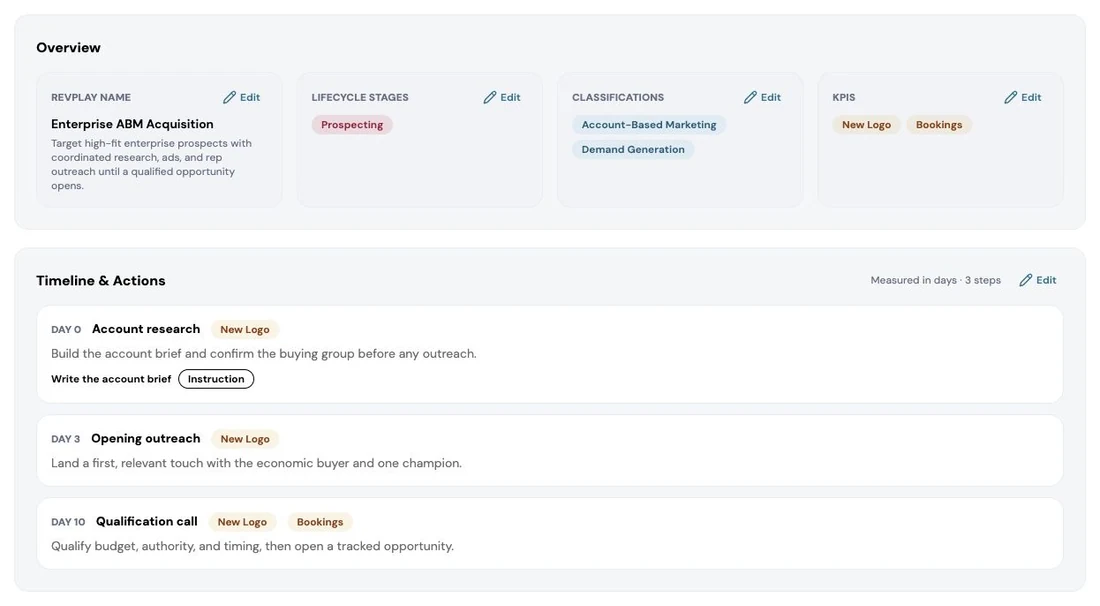
The Review and Activate step of a RevPlay. Before the play runs against a single account, the whole definition is laid out for a person to check: what it is called, which lifecycle stages it targets, how it is classified, the KPIs it is measured on, and every timed action in order. Nothing is enrolled until someone activates it here. Screenshot of the RevTech application; sample data. The finished motion read back in order, with its blockers listed rather than scored. - Step 6 of 6
Check the size before you activate
The reach summary tells you how many accounts currently match. Convert that into the number of actions your team will actually receive before you activate, because that number lands in somebody’s queue and it is much easier to narrow eligibility now than to apologise later.
What arrives
What this puts in your Action Center
| Item | What is prepared | How it resolves |
|---|---|---|
| RevPlayActionInstance | The instruction, objective, KPI and account context for one activated step | Opens the account; completion goes through the play |
| PlayPublishApproval | The version diff and a governance summary | Review only in a production tenant |
What to take away
- Repeatable means stable inputs, a visible owner and an inspectable output.
- Link the KPI at the start. It is what makes the impact read possible.
- Eligibility is a standing condition, not a selected list. That is what makes it a motion.
- Size the action volume before activating. It lands in a real queue.
Go deeper
The material behind this
See how the work gets done.
Explore how agents prepare work across your revenue teams, and how people review it, guide it and decide what happens next. Fictional data. Real product.
Explore the demo