Working the Analyst question library
A governed, read-only library where the platform decides when each question re-runs. What cadence tells you, what each state means, and who sees which questions.
A governed library, not a query box
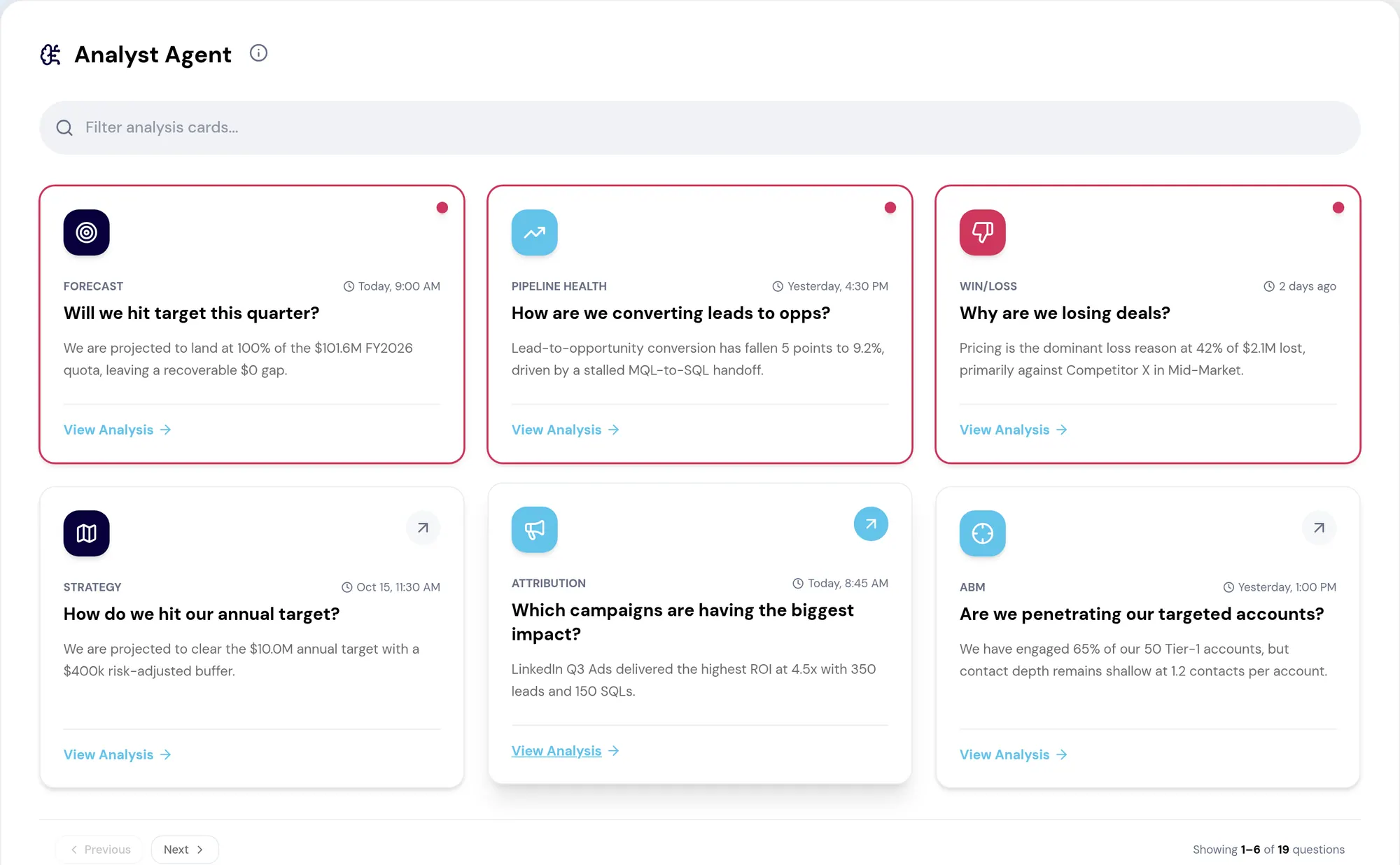
Analyst is a library of company-level revenue questions, each resolving to a prepared answer with its charts, reasoning and evidence. The set is defined rather than open-ended, and that is the point: a bounded set of questions asked the same way every time produces answers you can compare across quarters and defend when somebody disputes one.
The library is also server-owned. The questions, their wording, their categories and their availability all come from the platform, so a question your organization gains or loses appears or disappears without anybody shipping anything. The same list drives the grid, global search, the assistant’s Ask Analyst shortcuts and the role editor, which is why those four can never disagree about what exists.
What cadence is telling you
Every question carries a cadence — weekly, monthly or quarterly — and the surface shows it. What it does not show, and cannot, is a next-run timestamp: the platform states the recurrence and never computes a date from it.
So cadence is a bound on waiting rather than an appointment. A question with no result yet says it is generated weekly, which tells you the first answer is due inside a week. That is the honest version of the question everyone actually asks, which is "when does the next one arrive".
There is deliberately no configuration surface in this version. You cannot trigger a run, change a cadence, share a result or compare it against an earlier version. If your operating cadence needs an analysis to land before a specific meeting, that is a conversation with RevTech, not a setting.
- Cadence is displayed on the empty state, on a card with no result yet, and beside the result timestamps
- An unavailable question carries no cadence, and the surface says nothing rather than guessing
- Nothing in the product lets a user start a run — there is no button withheld by permission, there is no button
The states worth recognizing
Most of the judgement in using Analyst well is reading the state of an answer before reading the answer. The surface is deliberate about this: rather than hiding a run that failed or a result that is thin, it labels what you are looking at and keeps it usable.
- No result yet — the analysis has not been generated; the cadence bounds the wait
- A run in flight — the due clause drops while it is working
- A failed or credit-blocked run — the prior trustworthy result is kept and labelled, and the surface points at the next scheduled run
- Insufficient data — the limited result is preserved and marked as limited rather than suppressed
- Unavailable in this version — the question exists in the catalog but has no answer behind it here
- Temporarily unavailable — a service failure says so; it never falls back to sample content
Reading what comes back
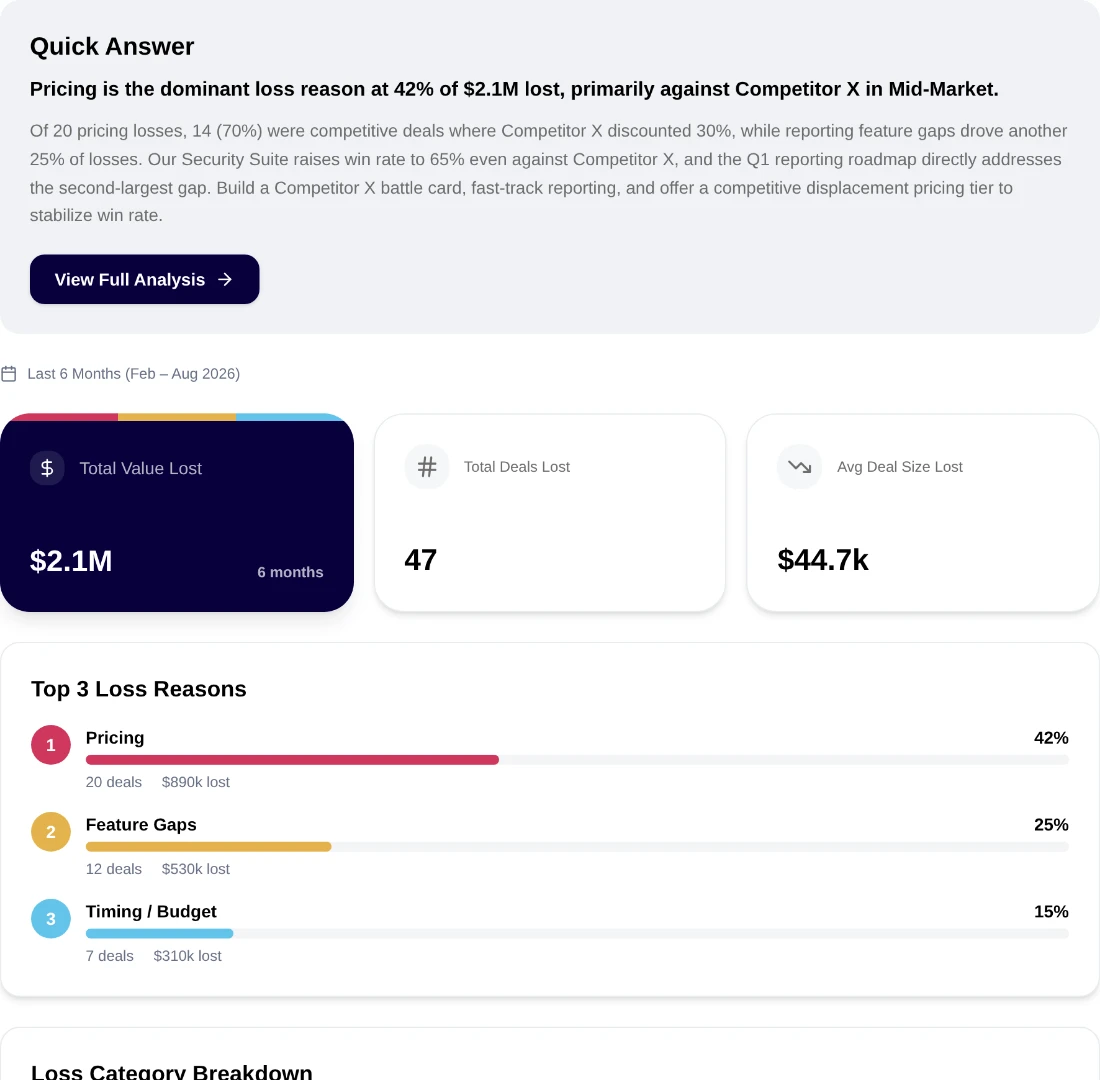
Every analysis opens with a quick answer: a concise summary that directly answers the question, with a short analysis under it. Full Analysis opens the structured write-up — executive summary, root cause, recommendations — and below the quick answer sit the KPI cards, charts and breakdowns the answer rests on.
Two details decide whether a number survives being repeated. "Source snapshot collected" is the moment the source data for that run was gathered; it is not a claim about how current your CRM is, and quoting it as one is the most common way to mislead a room with an accurate page. And a link on an entity means the platform resolved it to a record you are authorized to open — a plain label is a label, never a broken link.
The habit worth building is opening the supporting data once for any number you are about to carry into a decision.
Who sees which questions
Analyst access is granted per role, not per person, and it is granted question by question. In the role editor, giving a role the Analyst permission opens the question picker, and the set chosen there is what that role can open — in the library, in global search and in the assistant’s shortcuts alike.
This is the answer to the support ticket that always arrives in week two: a rep who cannot find a question a manager can see is looking at a working permission model, not a bug. It is also worth reviewing on the same rhythm as the rest of your access, since a question that reveals company-level performance is a reporting decision as much as a data one.
What to take away
- You cannot schedule an analysis. Cadence is server-owned, and the surface states the recurrence rather than a next-run date.
- Read the state before the number: a retained result from an earlier run is labelled as one, and it is not wrong — it is just not new.
- "Source snapshot collected" is when the source data was gathered for that run. It is not a statement about how fresh your CRM is.
- A question you cannot see is a grant you do not have. Question access is assigned per role, in the role editor.
- The quick answer is built to be quotable, which is exactly why it should not be the only thing you read before quoting it.
Put it to work
Jobs this page is behind
Try the demo.
See agents carry the repeatable work of GTM across sales, marketing, customer success, and RevOps. Every action prepared, reviewed, and recorded. Fictional data, real product.
Explore the demo