Slide 1 of 4
The surface the model actually lands on
Actions are the prioritized work surfaced each day (meetings, emails, deal reviews, compliance fixes, escalations) generated from your CRM, campaigns and inspection signals.
See the surface you will be working in every day, and learn what each part of an action card is telling you.
You have the model and you have the habits. What you do not yet have is familiarity with the surface, and that is worth ten minutes before you start working it for real, the first week is much easier when the layout is not also new.
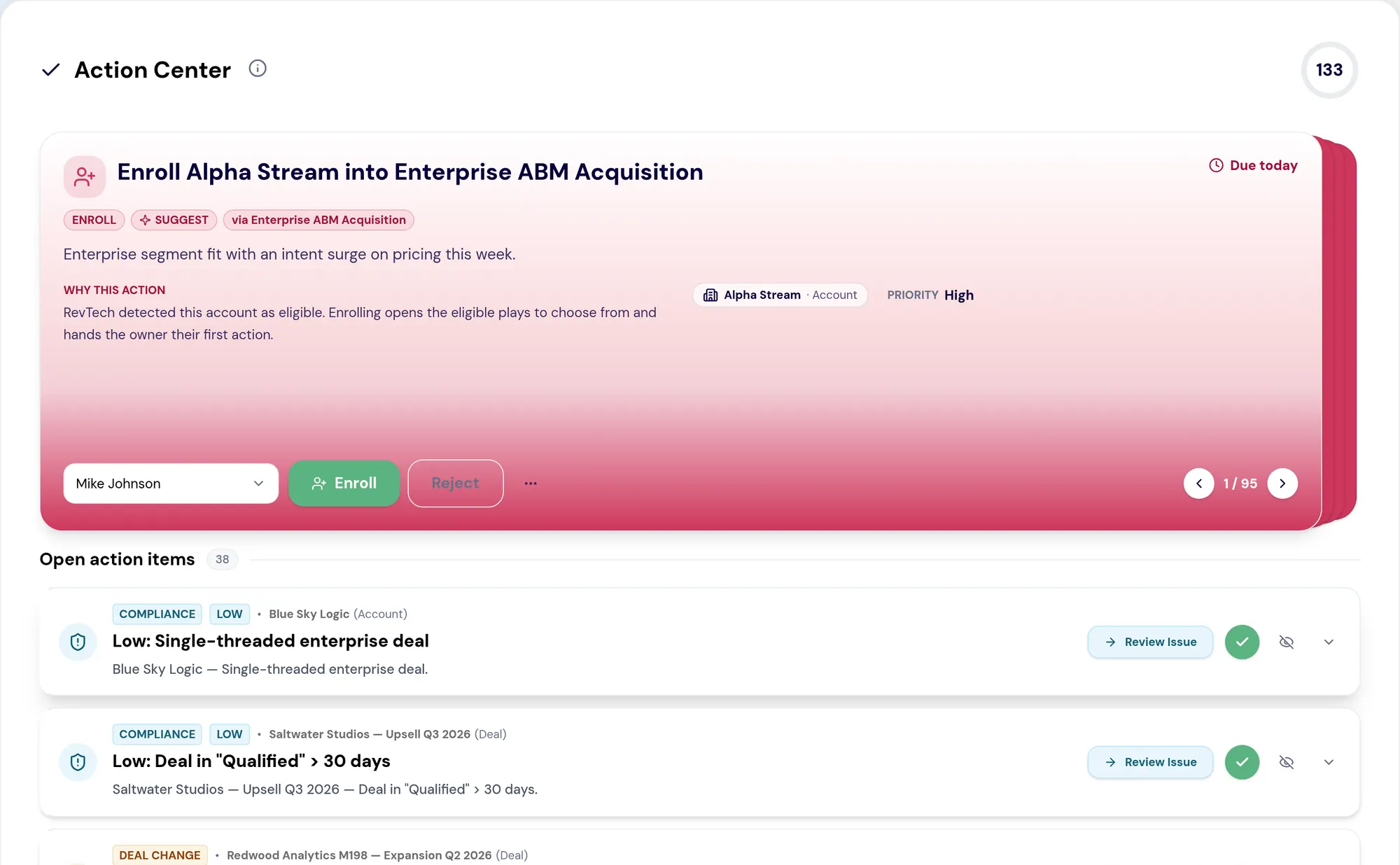
The queue groups work by urgency rather than by where it came from: Overdue, Today, Tomorrow and Upcoming, with a red rail on overdue items so they clear first. The badge on the nav item counts what is overdue or due today and stays in sync as you complete, ignore or escalate.
Mark Complete is always the primary action, and beside it sits the type-specific shortcut, Prep Meeting, Draft Email, Review Deal and so on, depending on what kind of work it is. The eye icon ignores an item. Clicking anywhere else expands the card.
The expanded view is the part worth learning properly, because it is where the reasoning lives: the source, the owner, how old the item is, its due date, the related CRM object, and the recommended next step. Escalate is there too, and it is a real routing act rather than a quiet handoff, the button turns red and carries a count of how many times the item has been escalated, which makes a repeatedly-bounced action visible instead of invisible.
Now watch the video
This lesson is the orientation. The material itself lives on its own page, kept in one place so it stays current everywhere it is referenced.
You should be able to answer each of these from memory before opening it. Recalling the answer is what makes it stick; recognizing it when you read it does not.
By urgency: Overdue, Today, Tomorrow, Upcoming, with a red rail on overdue. The badge counts items overdue or due today, and stays in sync as you complete, ignore or escalate.
The reasoning: source, owner, age, due date, the related CRM object, and the recommended next step. Escalate is there too, and it shows how many times the item has been escalated.
Actions are the prioritized work surfaced each day (meetings, emails, deal reviews, compliance fixes, escalations) generated from your CRM, campaigns and inspection signals.
Mark Complete is always primary. Next to it is the type-specific shortcut. The eye ignores; clicking elsewhere expands to source, owner, age, due date, related record and recommended next step.
It assigns the action to a teammate, turns red, and shows how many times it has been escalated. It is visible, not a quiet handoff.
See agents carry the repeatable work of GTM across sales, marketing, customer success, and RevOps. Every action prepared, reviewed, and recorded. Fictional data, real product.
Explore the demo