Slide 1 of 4
The timeline is the play
Each step carries a position in time, an objective, execution instructions, the KPIs it moves, and the actions completed there.
Lay out a motion on a timeline rather than as a chain of triggers, and know which parts of the motion that choice makes easier to reason about.
Step 2 of the builder is Timeline & Actions: a list of steps you position in time and fill in. Each carries five fields, and they are worth learning by name, because Review reads them back to you in exactly these terms.
Of those five, one split is worth protecting. The objective is what the step is for, and it survives a change of tactic. The instructions are how it is done this quarter, with this messaging, for this segment.
Teams that write only instructions end up with plays nobody can revise, because a year later nobody can tell which part was the point and which was just how they were doing it in March. There is no branching to configure either; the timeline is deliberately linear.
Most automation tooling models a motion as a chain of triggers: if this happens, do that; if it does not, wait and do this instead. It is expressive, and it is close to unreadable once there are more than a handful of branches. To know what a trigger graph does you effectively have to run it in your head.
A timeline is legible in a way a trigger chain is not. You can read it top to bottom, in order, and see the entire motion, which is exactly what the Review step asks a human to do before the play goes live. That legibility is not an aesthetic preference; it is what makes review possible, and review is where the governance in this model actually lives.
Signals have not gone anywhere — they decide who enters the play, which is the next module. The division is clean: signals govern entry, time governs progress.
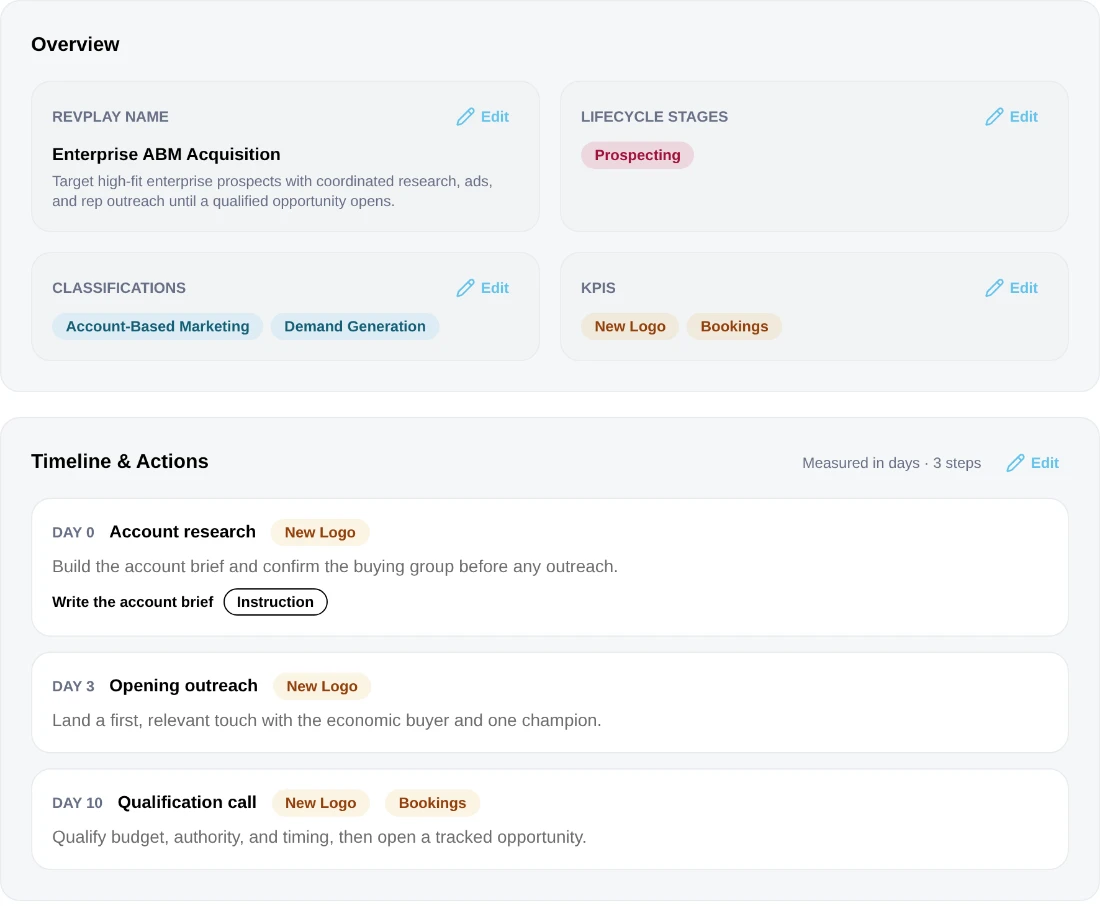
Because steps carry a position on the timeline, the interval between them is something you choose rather than something that falls out of a trigger firing. Choose it deliberately. Steps stacked too close together arrive in one person's queue on the same morning and get worked as a batch, which defeats the sequencing you just designed. Spread too far apart and each step arrives with no memory of the last, so the account experiences a series of unrelated approaches rather than a conversation.
A useful discipline when you are unsure: lay the steps out, then read the timeline as if you were the account receiving it. If the rhythm would strike you as inattentive or relentless, it will strike them the same way.
Take a motion most teams have some version of: a pilot finished, the outcome was decent, and the conversation went quiet. On a timeline that becomes four steps, and the day numbers are the design.
Day 0 is the trigger point, not a touch. The step assembles the pilot outcome, the stakeholder map and the original success criteria, and routes a briefing to the account owner. Nothing leaves the building. Day 2 is the first outreach, referencing the specific result the pilot produced, which is why it comes after the assembly step rather than alongside it. Day 9 is a second approach through a different stakeholder, because if the first landed you would not be here, and a second identical nudge to the same person is what makes buyers stop reading. Day 21 is the decision point: either the account is engaged and leaves the play, or it is not and the owner closes it out with a reason.
Notice what the intervals are doing. Two days is short enough that the briefing is still fresh in the owner's head. Seven days between the first and second approach is long enough not to nag and short enough that the pilot is still recent. Twelve days to the decision point stops the play from following accounts around indefinitely, which is the failure mode that quietly turns a re-engagement motion into a nuisance.
The last one is the quiet killer. A play with no end keeps accumulating accounts, and once the enrolled figure includes everything that ever entered, it stops telling you anything.
You should be able to answer each of these from memory before opening it. Recalling the answer is what makes it stick; recognizing it when you read it does not.
A position in time, an objective saying what the step achieves, execution instructions saying what the responsible person should do, the KPIs it moves, and the actions to complete there.
The objective is what the step is for and survives a change of tactic. The instructions are how it is done this quarter. Teams that write only instructions cannot tell later which part was the point.
In eligibility. Signals govern entry to the play; time governs progress through it.
Each step carries a position in time, an objective, execution instructions, the KPIs it moves, and the actions completed there.
Eligibility is where signals belong. Once an account is in the play, its progress is measured in days, which is also how the humans in the motion think about it.
The interval between steps is a decision. Too tight and the queue floods; too loose and the motion loses the thread of the conversation.
See agents carry the repeatable work of GTM across sales, marketing, customer success, and RevOps. Every action prepared, reviewed, and recorded. Fictional data, real product.
Explore the demo